

Static code analysis is the process of detecting flaws in software source code. Static analysis tools are useful for detecting common coding mistakes; some of the benefits of using them include:
- Make the source code more readable and maintainable.
- Prevent unexpected behavior at runtime.
- Improve execution performance.
- Make the code more secure.
Many C/C++ static analysis tools are available, each focusing on a specific area and offering its own advantages. Some examples include:
- CppCheck
- Clang Analyzer
- Visual C++ Analyzer
- VERA++
- Goanna
- Viva64
- PCLint
There are several ways to explore the results of these tools:
- XML format: XML files can be generated from each of these tools, and they can be used to create an HTML report or be consumed by another tool to explore the analysis results.
- HTML format: HTML is a convenient format for generating reports and sharing them with the team, and you can create custom reports using an XSL stylesheet.
- IDE Plugins: almost all well-known IDEs provide plugins for these tools, making it possible to view violations directly in the source code.
One of the problems with code quality tools is that they tend to overwhelm developers with problems that aren’t really problems — that is, false positives. When false positives occur, developers learn to ignore the output of the tool or abandon it altogether.
To better explore their results, it is useful to have a way to focus only on relevant findings and provide developers with a clear view of the results.
CppDepend and CQLinq
CppDepend is another static analysis tool that complements the others. It uses a code query language based on LINQ (CQLinq) to query the codebase like a database.
CppDepend embeds Cppcheck, Vera++ and the Clang analyzer by default, and it can easily be extended to support other static analysis tools using its API. The Visual Studio Analyzer plugin source code is available to show how to integrate other tools.
Let's take the Clang source code as an example and see how we can explore the results of these tools with CppDepend.
Get all issues:
The query to retrieve all issues is very simple. However, as you can see, it's not very interesting — indeed, dealing with a result containing 331,417 issues is challenging.
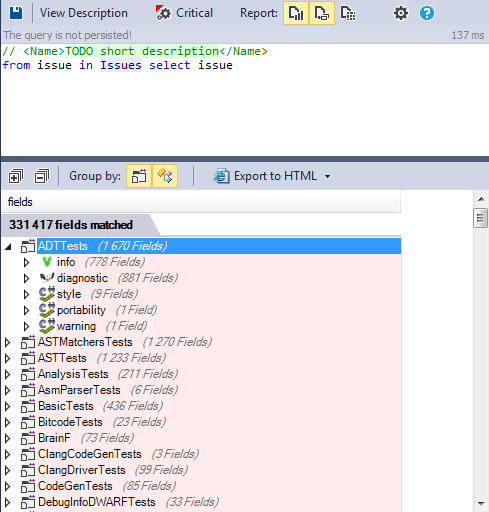
To better handle the results of these tools, we can filter them and focus only on what we want.
Requests by tool
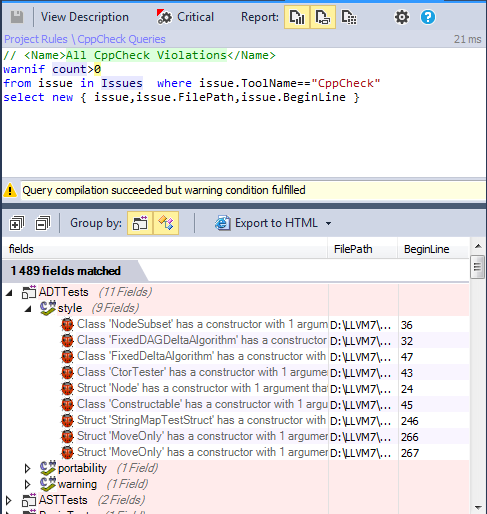
We can modify the first request and add a criterion for the relevant tool.
Most frequently reported issues
It’s interesting to know which issues are reported most frequently by these tools.
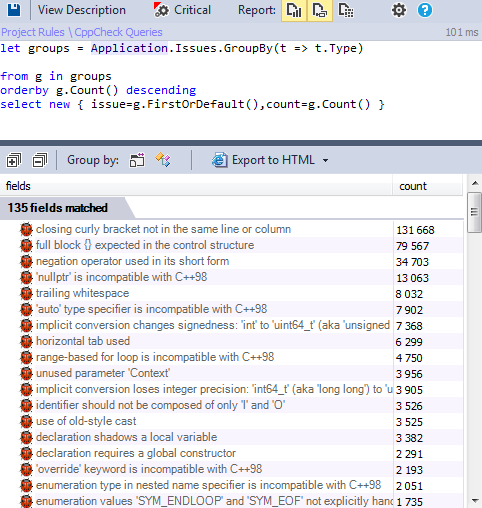 The most recurrent ones concern the style issues reported by Vera++; we can exclude them from the query if they are not relevant in your case.
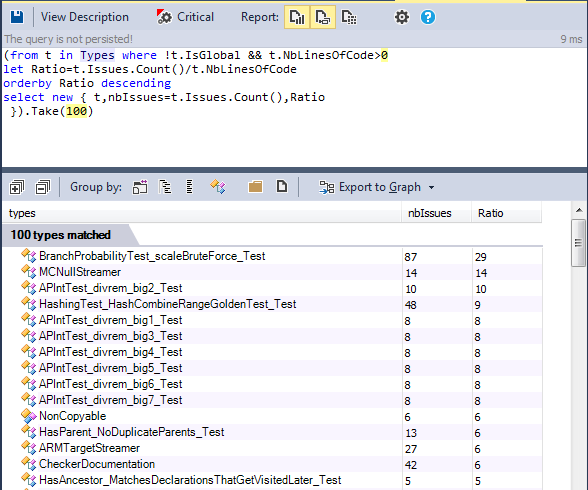
Classes with the most issues
It's very interesting to know which classes contain many violations.
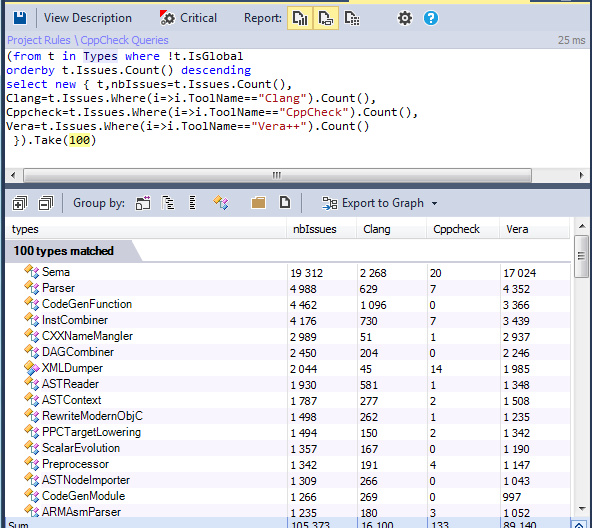
The previous query is interesting, but it doesn't tell us exactly which classes have the most significant quality problems. Another useful metric to take into account is NBLinesOfCode. We can modify the previous request and calculate the ratio between the issue count and NBLinesOfCode.
Most widely used methods with issues
When static analysis tools report issues, it's useful to know which ones should be prioritized, especially if they concern bugs. A bug could exist in a specific method, but what's interesting to know is how many methods are affected by the bug. Widely used methods are called by more code, and it's better to resolve their issues quickly.
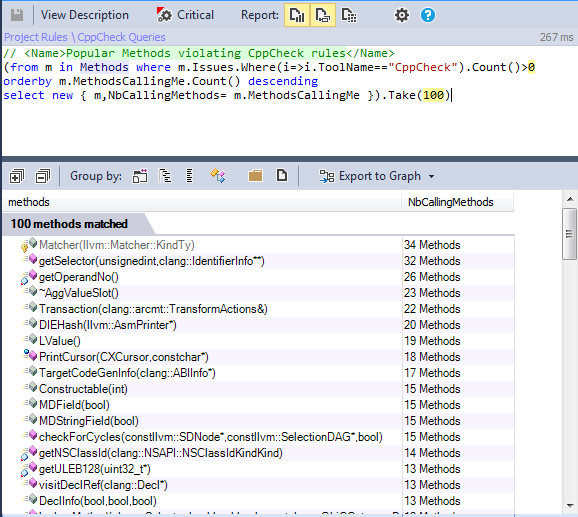
Using CQLinq, we can combine the results of all these tools and also the results of CppDepend to create more elaborate queries, and add these checks to the build process.
Issue Trends
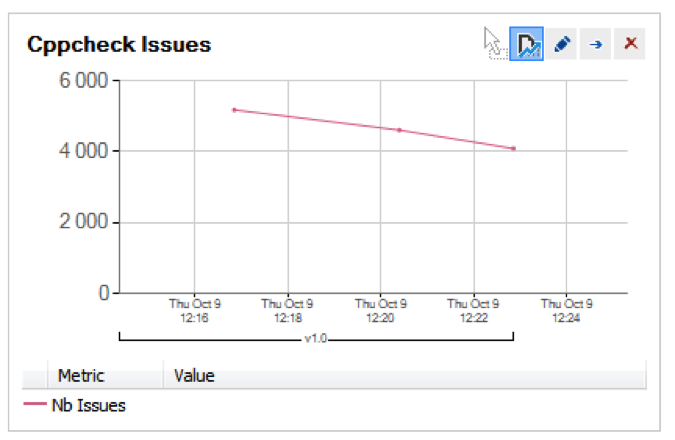
Issues are not unusual in a software project; any project can have problems that need to be resolved. However, we should monitor the project's quality trend. Indeed, it's a bad indicator if the number of issues grows as the project changes and evolves. CppDepend provides the Trend Monitoring feature to create trend charts.
Trend charts are built from metric values recorded over time during analysis. More than 50 trend metrics are available by default, and it is easy to create your own trend metrics.
With this trend chart, we can monitor how Cppcheck issues evolve over time:
Integrate static analysis tool results into the HTML report
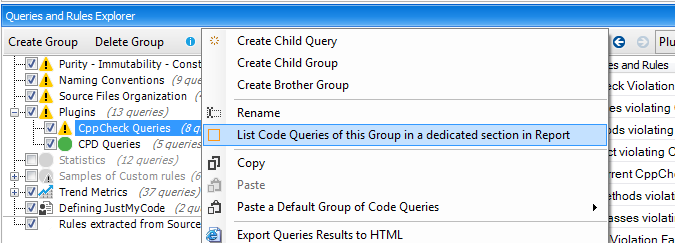
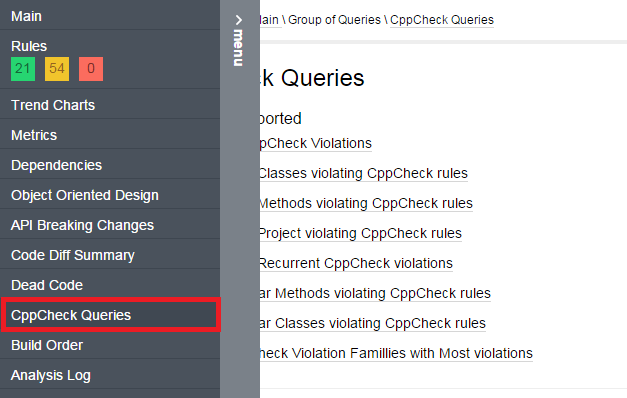
CppDepend makes it possible to append extra report sections to the HTML report that list some CQLinq queries.
In the CQLinq Query Explorer panel, a particular CQLinq reported group is bordered with an orange rectangle.
And in the HTML report these added sections are accessible from the menu:
Integrate static analysis tool results into the build process
CppDepend comes with the notion of Critical CQLinq Rule. Critical rules provide a way to define high-priority rules that must never be violated. With critical rules, it is possible to break the Build Process when a critical rule violation occurs.
A critical rule is just a CQLinq rule with the flag Critical Rule checked:
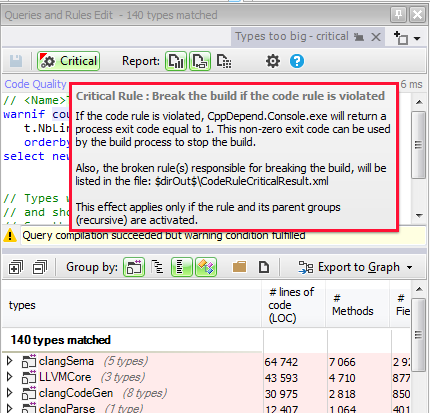
During the build process, when a critical rule is violated, CppDepend.Console.exe returns a non-zero exit code. This behavior can be used to break the Build Process if a critical rule is violated.
We can easily define a Cppcheck critical rule to break the build if specific kinds of Cppcheck issues are found.
Conclusion
CppDepend is open to other static analysis tools, and you can also easily integrate your own custom tool. This way you can use all the CppDepend features to better explore the results from supported C/C++ static analysis tools.