Declare CQL constraints in C# or VB.NET source code
CQL constraints of an NDepend project are stored as raw text in the XML project file.
CQL constraints can also be stored in C# or VB.NET source code.
This facility is especially useful when a constraint implies a code element.
Consider this piece of code:

In the CQL query editor in VisualNDepend.exe,
let's write a custom constraint that checks that when a method is calling the method Foo1(), it must also call the method Foo2(int).

Let's declare this constraint in the C# source code.
Right click the editor and select: Copy to clipboard to insert this query in C# source code ...

... and paste the clipboard content just before the Fct1() method definition.
An attribute is now tagging the Fct1() method definition.
This attribute contains our CQL constraint as a string.
It makes sense to declare such constraint near the Foo1() / Foo2(int) methods definitions.
This way, during code review or refactoring developers couldn't miss it.
This is active documentation. The same way the C# compiler checks privacy when finding the private keyword in source code,
the NDepend analyzer checks a custom constraint when finding a CQL constraint in source code.
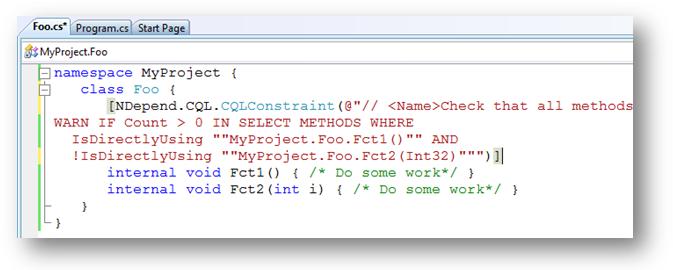
The attribute class is CQLContraintAttribute declared in the namespace NDepend.CQL declared in the assembly NDepend.CQL.dll.
This assembly can be found in $NDepend install dir$/Lib.
It is freely redistributable.
For conveniency, it is also very small, less than 10KB.
Don't forget to reference the assembly NDepend.CQL.dll from your project.

Each time the project will be analyzed, the CQL constraint is now extraced and included in the list.
A dedicated group named Constraints extracted from Source Code is automatically created.
This group and its children are read-only.
Constraints extracted are organized by assemblies / namespaces where they are declared.
Notice the facility to Go to Constraint Declaration in Source Code:

Tips 1: You can use the tag $FullName$ inside the CQL constraint text.
It will be automatically replaced by the full name of the code element tagged.
There is also the tag $Name$:
- If an assembly is tagged, $Name$ and $FullName$ will be both replaced with the assembly name (without .dll or .exe extension).
- If a type is tagged, $Name$ is the name of the type without the namespace and $FullName$ include the namespace.
- If a method or a field is tagged, $Name$ is the name of the member (including method signature for method) and $FullName$ include the namespace and the type name.
- In both C# and VB.NET, a namespace's declaration cannot be tagged with an attribute.

Tips 2:
It can be tedious to define a constraint for each code element that must satisfy a particular constraint.
For example, we want to avoid writing dozens of constraints to check the full test coverage of dozens of types.
Such scenario can be handled by defining a dedicated attribute such as the NDepend.CQL.FullCoveredAttribute.
Let's tag each class or structure 100% covered by tests with the FullCoveredAttribute...

Now, the full coverage of classes and structures can be verified with a single CQL constraint:

The following query can be used to demand for types 100% covered by tests not tagged yet with the FullCoveredAttribute:

The FullCoveredAttribute and some other attributes are also defined in the NDepend.CQL.dll assembly. This includes:
- ImmutableAttribute to continuously check that a class or a structure is immutable.
- PureAttribute to continuously check that a method is pure, i.e it doesn't provoke any side effect by modifying some fields states.
- GeneratedAttribute to tag generated code. This way it is easy to differentiate generated code and handcrafted code while writing constraints.
- CouldNotBeInternalAttribute to tag public classes or methods deemed as CoulbBeInternal but that cannot be internal for some reasons (such as some elements must be public for some designer or for tools such as serializer or unit tests runner).
The default set of CQL constraints contains constraints associated with these attributes.
It is up to you to define your own attributes classes and your own constraints for your own needs.
Tips 3:
If you don't want to bind with NDepend.CQL.dll you can copy-paste the following attribute class inside your source code.
It is working as long as you don't modify anything (namespace name, class name, property name...).



.