

When the processes running on your machine attempt to allocate more memory than your system has available, the kernel begins to swap memory pages to and from the disk. This is done to free up enough physical memory to meet the requester’s RAM allocation requirements.
Excessive use of swapping is called thrashing and is undesirable because it lowers overall system performance, mainly because hard drives are far slower than RAM.
If your application needs to process a large amount of data, it may be exposed to thrashing and could slow down dramatically. Two solutions exist: either optimize your applications to use memory more efficiently, or add more physical RAM to the system.
Let's discover which solution Doxygen uses to optimize its memory usage and avoid the thrashing problem.
Doxygen is the de facto standard tool for generating documentation from annotated C++ sources, but it also supports other popular programming languages such as C, Objective-C, C#, PHP, Java, Python, and many others. Many thanks to Dimitri van Heesch for his tremendous effort in developing and maintaining the project.
Doxygen takes the source files as input, parses them to extract the needed data, and stores the result in class instances of the kinds DirDef, FileDef, NamespaceDef, ClassDef and MemberDef. All of them inherit from the Definition class.
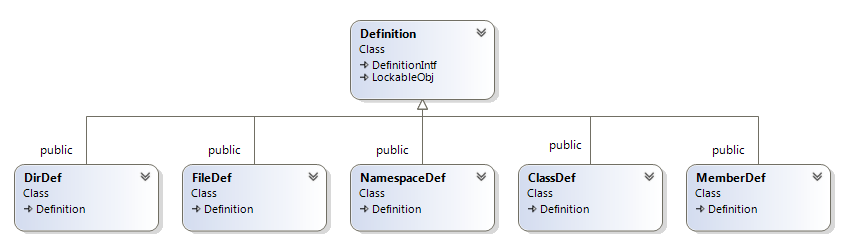
The instances of these classes will then be used to generate the documentation. The data that consumes the most memory is the information about methods and variables, which is represented by the MemberDef class. The size of these instances could grow to exceed 1 GB, depending on the number of methods and variables in the projects being processed.
For some projects, storing all these instances in memory can affect system performance, and generating the documentation could take many hours.
How does Doxygen optimize memory?
Doxygen uses a cache-based solution; using a cache is a popular way to optimize your memory usage. The idea is to store in a cache the data that needs to be in memory. This cache contains many slots, each holding a specific piece of data. Some slots are released when the cache exceeds a certain size. The released data is moved to disk, and if we need it again, it is moved back to memory.
In the case of Doxygen, the algorithm is very simple:
- Define a cache with 65,535 slots.
- When a MemberDef instance needs to be created, Doxygen checks if a cache slot is available. If it is, the instance is created in memory; otherwise, it is stored in a data file on disk, and an index file is updated to record where in the data file this data is stored.
- If Doxygen needs to access a MemberDef instance, it checks whether it is present in the cache. If it's not present, Doxygen reads from the index file where its data is stored, seeks to this position in the data file, and loads it from disk.
The performance of the cache depends on:
- The container: it could be a queue, an array, a list, or maybe a custom container. The choice of container can affect cache performance.
- The maximum size of the cache.
- The algorithm used to free entries from the cache. When the cache reaches its maximum, you have to decide which entries to release. For example, you could:
- Release the first slots loaded.
- Release the last slots loaded.
- Release the least-used slots.
1. The Container
Doxygen defines the ObjCache class, which is a linked list of CacheNode objects. This class is responsible for adding and removing instances from the cache.
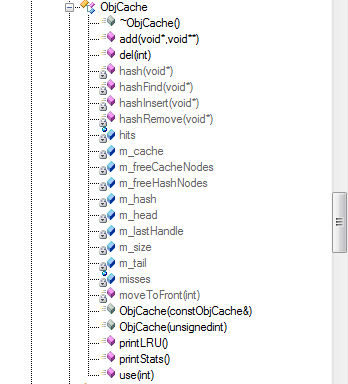
Here's how Doxygen declares its cache:
Doxygen::symbolCache =new ObjCache(16+cacheSize);// 16 -> room for 65536 elements, 2. Cache size
Doxygen gets the cache max size from the configuration file:
int cacheSize =Config_getInt("SYMBOL_CACHE_SIZE");It is a good idea to make this parameter configurable, so you can increase the cache if you have a machine with a large amount of physical memory, to improve cache performance. However, in newer Doxygen releases, this parameter has been removed from the configuration file, and a default value is used.
3. The algorithm to release entries from the cache
Here's the code snippet from the Doxygen source code responsible for releasing cache entries when the cache reaches its maximum:
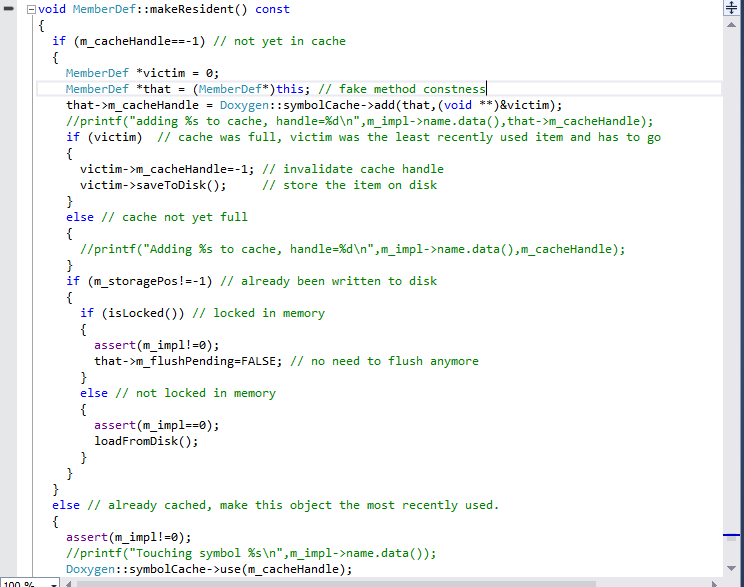
As specified in the
makeResidentmethod code, which is very well commented, the least recently used item is removed if the cache is full.
This method is invoked for almost all
MemberDefmethods, it’s called each time you have to access the
MemberDefstate to check if this member is loaded or not, load it if it's not the case, and remove the least recently used member from the cache.
The impact of using the cache
Using a cache can improve the performance of your application, but does it bring a big optimization, or is it just a micro-optimization that isn't worth adding to your application?
Before using Clang as the C/C++ parser for our product, we used Doxygen as the parser for our first version. We ran many tests on cache size: when we disabled the cache and parsed some C++ projects with this modified version, the parsing time increased dramatically, sometimes from 5 minutes to 25 minutes. For large projects, it can take hours and significantly affect system performance.
Conclusion
Using a cache is a powerful way to improve application performance when working with large amounts of data. Exploring how open-source projects implement their caches can be very useful when designing one for your own applications.