

Every project has its own style guide: a set of conventions for how code should be written. Some managers choose basic coding rules, while others prefer more advanced ones. In many projects, however, no coding rules are specified at all, and each developer uses their own style.
It is much easier to understand a large code base when all the code in it is written in a consistent style.
There are many resources on coding best practices. We can learn good coding rules by:
- Reading a book or magazine.
- Using online resources.
- Learning from a colleague.
- Taking a training course.
We can also work with an expert for a few months to improve the team’s coding skills. However, finding the right person is not easy, and it can cost the company a lot of money. But why search for an expert when we can learn from exceptional developers like Linus Torvalds? Simply exploring source code that he has developed or maintained can provide valuable insights into how to write efficient C code.
Linus Torvalds is widely recognized for creating the Linux kernel — and serving for many years as its principal developer — as well as for creating the highly popular distributed version control system, Git. That alone makes his code well worth studying :)
Inside the Git source code
Let’s take a look at a code snippet from Git:
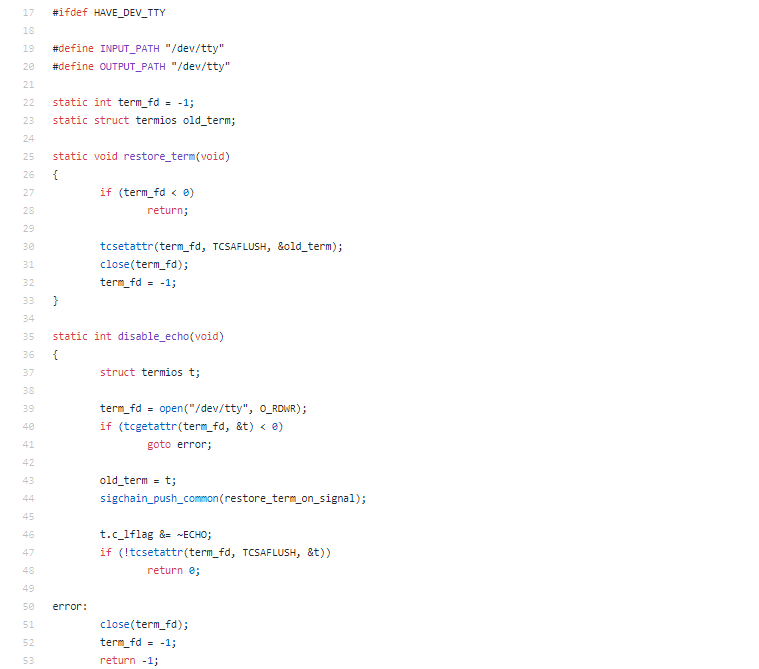
Here are a few observations about this code:
- The functions are declared static.
- The functions return an error code.
- The functions have few parameters.
- The function exits as early as possible.
- The variables are declared static.
- The variable names are easy to understand.
- The functions are very short.
- The code is well indented.
- No extra comments in the body: the code speaks for itself.
- The function bodies are well indented.
- The define guards are clear.
As we browse the Git source code, we can see how consistently it is implemented: the same best practices are applied throughout. To verify this, let’s search for static functions:
from m in Methods where m.IsStatic select m
The treemap is very useful for getting an overview of the code elements matched by a CQLinq query; the blue rectangles represent the results.
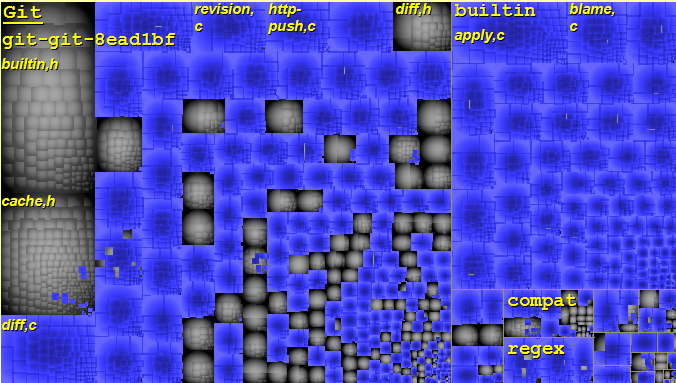
Almost all functions are declared static, so they are visible only in the translation unit where they are declared.
Inside the Linux kernel source code
Let’s switch to the Linux source code and look at the following function implementation:
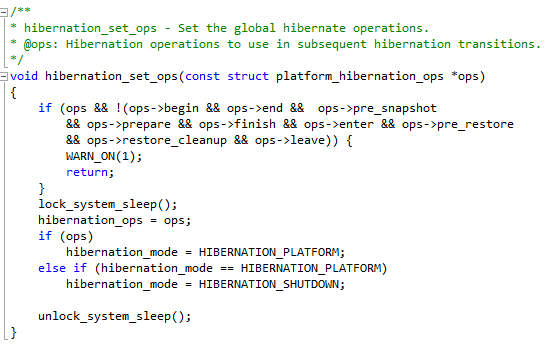
The code looks very clean. In particular, the function
- has only a few lines of code.
- Its signature is well defined.
- It’s well commented.
- The code is well indented.
- The variable names are very clear.
- const correctness is respected.
- It checks the input parameters and issues a warning if they do not meet certain conditions.
Another developer might implement the same function like this:
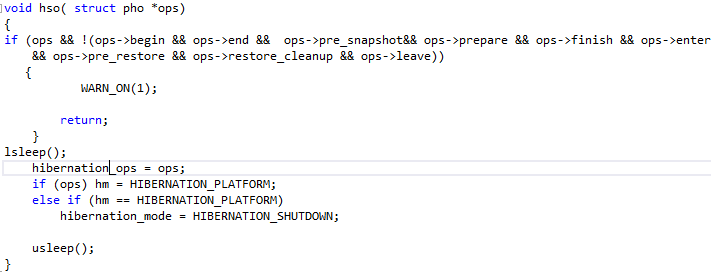
Coding style has a major impact on source code readability. Investing a few hours in developer training and conducting periodic code reviews can make the code much easier to maintain and evolve.
Let’s explore the Linux kernel source code using CppDepend and discover some basic coding rules adopted by its developers.
Modularity
Modularity is a software design technique that increases the extent to which software is composed of separate parts; modular code is easier to manage and maintain.
For a procedural language like C, which does not have logical constructs such as namespaces, components, or classes, modularity can be achieved through directories and files.
Here are some possible scenarios:
- Put all the source files in one directory.
- Isolate files related to a module or a submodule into a specific directory.
In the case of the Linux kernel, directories and subdirectories are used to modularize the kernel source code.
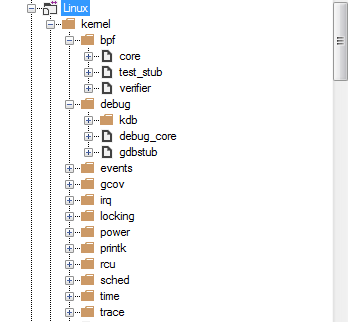 Encapsulation
Encapsulation involves hiding functions and data that are internal to an implementation. In C, encapsulation is performed by using the keyword static. These entities are called file-scope functions and variables.
Let’s search for all static functions by executing the following CQLinq query:

We can use the Metric view to get a good idea of how many functions are concerned. In the Metric View, the code base is represented by a treemap. Treemapping is a method for displaying tree-structured data by using nested rectangles. The tree structure used in a CppDepend treemap is the usual code hierarchy:
- Projects contain directories.
- Directories contain files.
- Files contain structs, functions and variables.
The treemap view provides a useful way to represent the result of a CQLinq query, so we can visually see the types concerned by the query.
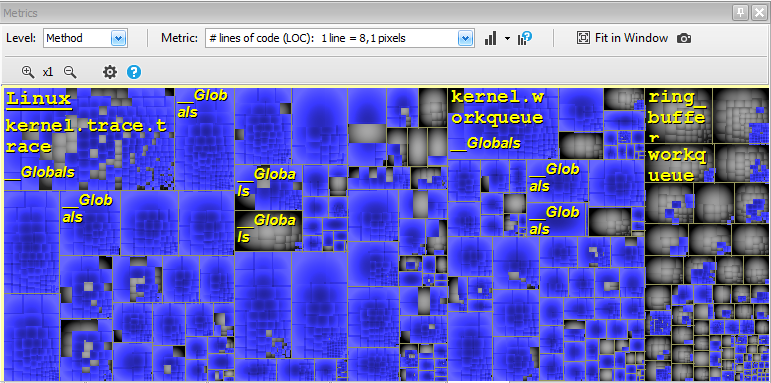
As we can see, many functions are declared static.
Let’s search now for the static fields:
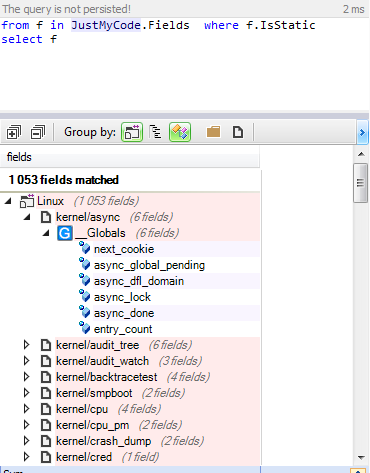
As with functions, many variables are declared static.
In the Linux kernel source code, encapsulation is used whenever functions and variables must be private to the file scope.
Use structs to store your data model
In C programming, functions use variables to perform their processing; these variables can be:
- Static variables.
- Global variables.
- Local variables
- Variables from structs.
Each project has its data model, which can be used by many source files. Using global variables is one option, but it is generally better to group related data into structs.
Let’s search for global variables with a primitive type:
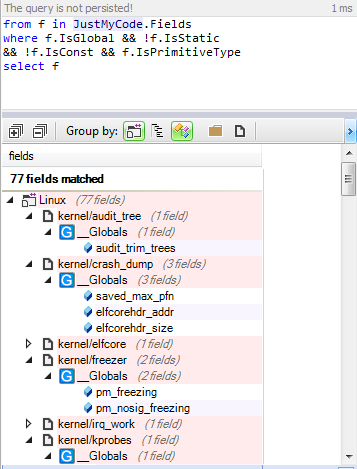
Only a few variables are concerned, and some of them could perhaps be grouped into structs, such as (elfcorehdr_addr and elfcorehdr_size) or (pm_freezing and pm_nosig_freezing).
Keep functions short and sweet
Here’s some advice about the length of functions from the Linux coding style web page:
Functions should be short and sweet, and do just one thing.  They should
fit on one or two screenfuls of text (the ISO/ANSI screen size is 80x24,
as we all know), and do one thing and do that well.

The maximum length of a function is inversely proportional to the
complexity and indentation level of that function.  So, if you have a
conceptually simple function that is just one long (but simple)
case-statement, where you have to do lots of small things for a lot of
different cases, it's OK to have a longer function.
Let’s search for functions with more than 30 lines of code.
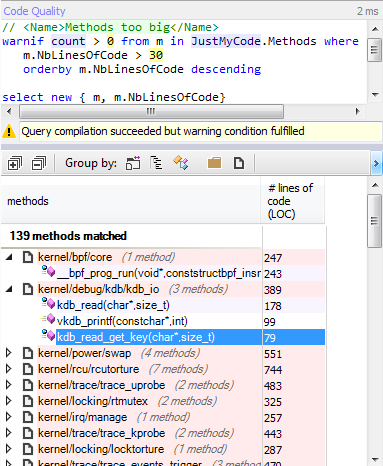
Only a few methods have more than 30 lines of code.
Function number of parameters
Functions where NbParameters > 8 might be painful to call and might degrade performance. Another alternative is to provide a structure dedicated to handling arguments passing.
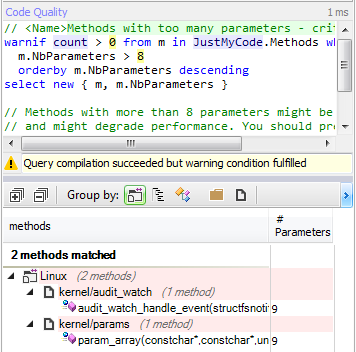
Only two functions have more than eight parameters.
Number of local variables
Methods where NbVariables is greater than 8 can be difficult to understand and maintain. Methods where NbVariables is greater than 15 are extremely complex and should be split into smaller methods, unless they are automatically generated by a tool.
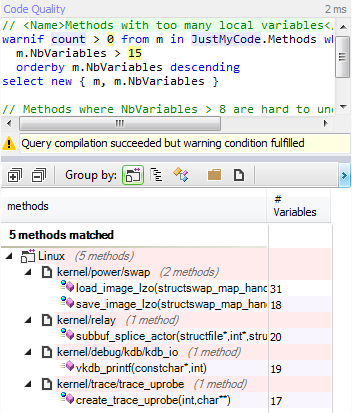
Only five functions have more than 15 local variables.
Avoid defining complex functions
Many metrics can be used to identify complex functions; NBLinesOfCode, the number of parameters, and the number of local variables are among the most basic.
There are also other useful metrics for identifying complex functions:
- Cyclomatic complexity is a popular procedural software metric equal to the number of decisions that can be taken in a procedure.
- Nesting Depth is a metric defined on methods, relative to the maximum depth of the most nested scope in a method body.
- Max Nested Loops equals the maximum level of loop nesting in a function.
The maximum acceptable values for these metrics depend largely on the team’s preferences; there are no universal thresholds.
Let’s search for functions that are candidates for refactoring:
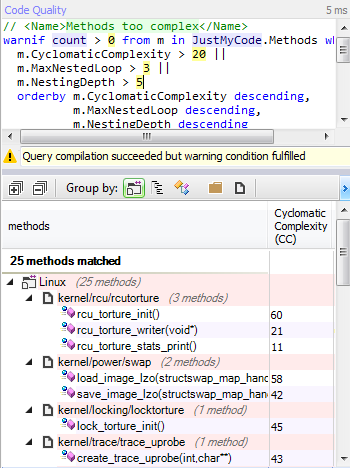
Only very few functions could be considered complex.
Naming convention
There is no universal naming convention; each project can adopt the one that best suits its needs. What matters most is applying the chosen convention consistently.
In the case of Linux, structs must begin with a lowercase letter, and we can check if that’s true for the whole kernel source code — let’s execute the following query:
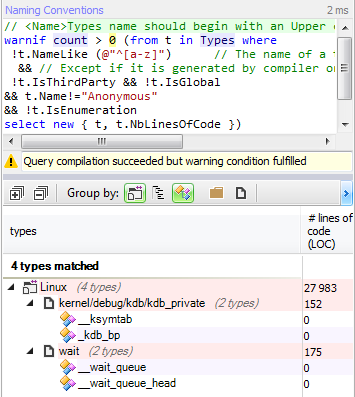
Only four structs begin with “_” instead of a lowercase letter.
Indentation
Indentation is very useful for making code easy to read; here are the motivations behind it from the Linux coding style web page:
Rationale: The whole idea behind indentation is to clearly define where
a block of control starts and ends.  Especially when you've been looking
at your screen for 20 straight hours, you'll find it a lot easier to see
how the indentation works if you have large indentations.

Now, some people will claim that having 8-character indentations makes
the code move too far to the right, and makes it hard to read on a
80-character terminal screen.  The answer to that is that if you need
more than 3 levels of indentation, you're screwed anyway, and should fix
your program.Exploring well-known open-source projects is a great way to improve your programming skills, especially when those projects are developed and maintained by experts. There is no need to download and build the project — you can simply browse the code on GitHub.