
What’s new in 2027.Built for safety-critical C/C++.
A release for embedded, automotive, aerospace and safety-critical teams: compliance kits for the standards you are audited against, an SBOM and vulnerability check, real-time and ROS 2 analysis, an on-premises server, and AI assistants that work from your analysis facts.
Every change, explained.
Compliance KitsNew
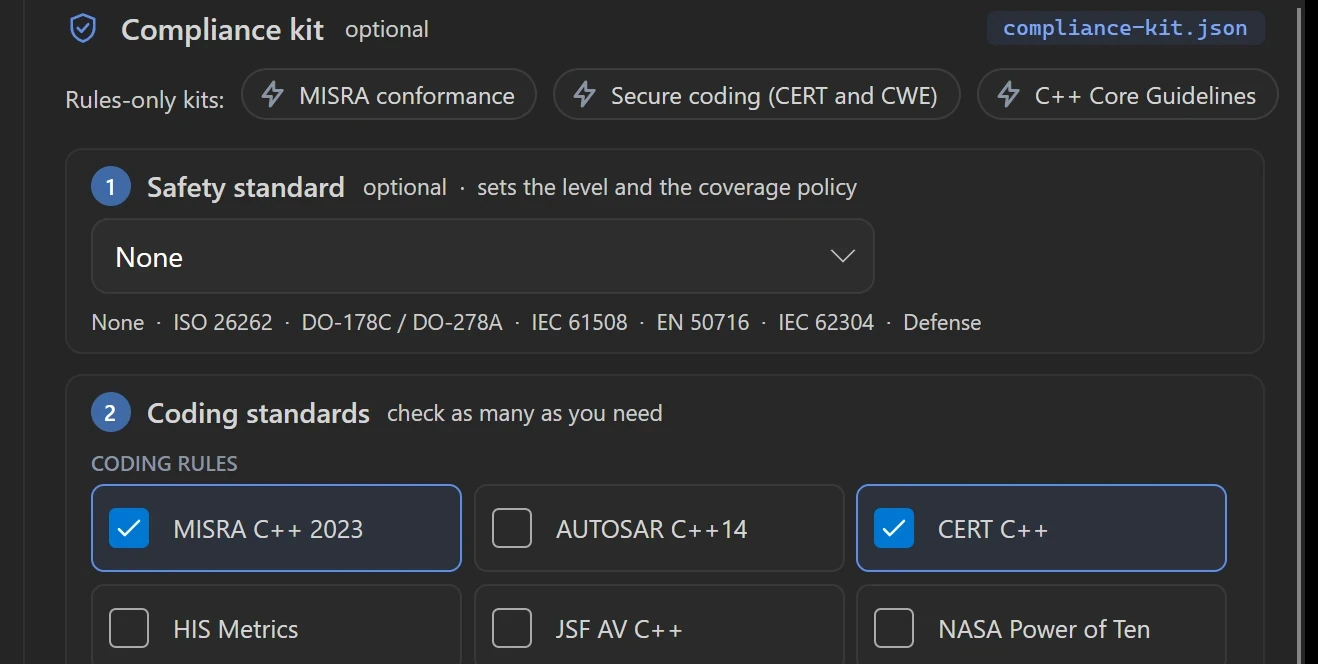
A compliance kit prepares a project for a standard at the moment you create it. It switches on the right coding rules, sets the level and the coverage policy, and writes the files you need for an audit.
Choosing a kit
In Create New Project, for C and C++ projects, the Compliance kit block has two steps and a row of shortcuts. The choice is stored in compliance-kit.json next to the project.
| Kit | Domain | Kind |
|---|---|---|
| ISO 26262 | Road vehicles (ASIL) | Safety standard |
| DO-178C / DO-278A | Airborne and ground software (DAL) | Safety standard |
| IEC 61508 | Functional safety (SIL) | Safety standard |
| EN 50716 | Railway | Safety standard |
| IEC 62304 | Medical device software (class) | Safety standard |
| Defense (JSF, MIL-STD-882E) | Aerospace and defense | Safety standard |
| MISRA conformance | MISRA rules for your language | Rules-only |
| Secure coding (CERT and CWE) | Vulnerabilities | Rules-only |
| C++ Core Guidelines | Modern C++ | Rules-only |
- Safety standard (optional, one choice): sets the level (ASIL, DAL, SIL, class…), the coverage policy, and ticks the coding standards that belong to it.
- Coding standards (as many as needed): the boxes are always the final result. A box you tick yourself is marked added.
| Coding rules | Cybersecurity |
|---|---|
| MISRA C++ 2023, MISRA C 2025, AUTOSAR C++14, CERT C++ / CERT C, HIS Metrics, JSF AV C++, NASA Power of Ten, C++ Core Guidelines, CWE | ISO/SAE 21434, IEC 62443-4-1, NIST SSDF / EU CRA, IEC 81001-5-1 |
The rules-only shortcuts set the safety standard to None and tick the rules of that kit: no level and no coverage policy. A live summary shows the rules switched on, the level, the coverage policy and the files that will be created. With nothing chosen the standard rule set applies and nothing is created.
In the application
- The Compliance section of the tree: Compliance Summary, Coverage Compliance, Deviations and Standards Coverage.
- Deviations: record and justify a deviation from a rule (the AI can draft the justification, see AI Assistants).
- Findings of the RTOS and ROS 2 analyses carry standards references (see Actionable findings).
- An HTML documentation of the kits ships with the product: an overview page and one page per kit.
AI AssistantsNew
An assistant is only as good as its context. CppDepend gives it your technical debt, rules and issues, metrics, dependencies, quality gate and changes since the baseline. Three ways to use it, all on the same analysis result:
| Way | What it is | Use it to |
|---|---|---|
| MCP server | Any MCP client (Claude, Copilot, Cursor…) asks CppDepend live questions instead of guessing from source files. | Read issues, debt, metrics and dependencies on demand; run CQLinq queries. |
CLI and CI cppdepend-ai | A command-line program shipped with the product, for build servers. Works with Claude Code, Codex, Copilot, Cursor, Gemini CLI and assistants without MCP. | Review a change or pull request before merge; check the quality gate and fail the build when quality drops. |
| Built in | AI inside Visual CppDepend, using the provider you configure once. | Chat with Code, explain and fix an issue, draft a deviation justification, build prompts. |
cppdepend-ai init
cppdepend-ai analyze --run
cppdepend-ai review --base main
Inside Visual CppDepend
- Chat with Code: ask in plain language. The AI writes a CQLinq query, CppDepend runs it on your result, and the rows appear in a grid. Follow-up questions are supported.
- Explain this issue and Fix this issue.
- Draft deviation justification for the Deviations page.
- Review Changes and AI Agent pages.
- AI Prompt Builder: assemble a prompt from the facts CppDepend knows.
- AI Provider: OpenAI (GPT), Anthropic (Claude), Google Gemini, or any OpenAI-compatible or local server. Model, endpoint, answer length and timeout per provider; fetch the model list; test the connection.
SBOMNew
The Dependencies and SBOM page (section Safety & Security) lists the third-party components of your code, their licences and their known vulnerabilities, and exports the inventory.
- Manifests read:
vcpkg.json,conanfile, CMake, git submodules and Meson wraps. The scan covers the folders you configure on the page; nothing is guessed and no parent folder is searched. - Licences classified as Permissive, Weak copyleft, Strong copyleft or Unknown.
- Vulnerabilities from OSV.dev during the analysis. Without internet access the result of the last check is used, and a stale check is reported.
- Exports: CycloneDX 1.5 (JSON), SPDX 2.3 (JSON) and CSV.
- Imported issues of the tool
SBOM, so they appear in the Issues panel, the report and the quality gates.
| Issue | Meaning |
|---|---|
SBOM-VULN-CRITICAL / HIGH / MEDIUM / LOW / UNKNOWN | A known vulnerability, by severity. |
SBOM-LICENSE-STRONG / WEAK / UNKNOWN | A copyleft or unknown licence to review. |
SBOM-NO-VERSION | A dependency without a version: it cannot be checked. |
SBOM-NOT-CHECKED | Vulnerability data not available for this dependency. |
SBOM-DATA-STALE | The vulnerability data is older than the allowed age. |
Switches for the console and CI: CPPDEPEND_SBOM_ISSUES=0 turns the import of SBOM issues off; CPPDEPEND_SBOM_ONLINE=0 never calls OSV.dev and uses the cache.
SBOM-NOT-CHECKED, not hidden.On-Premises ServerNew
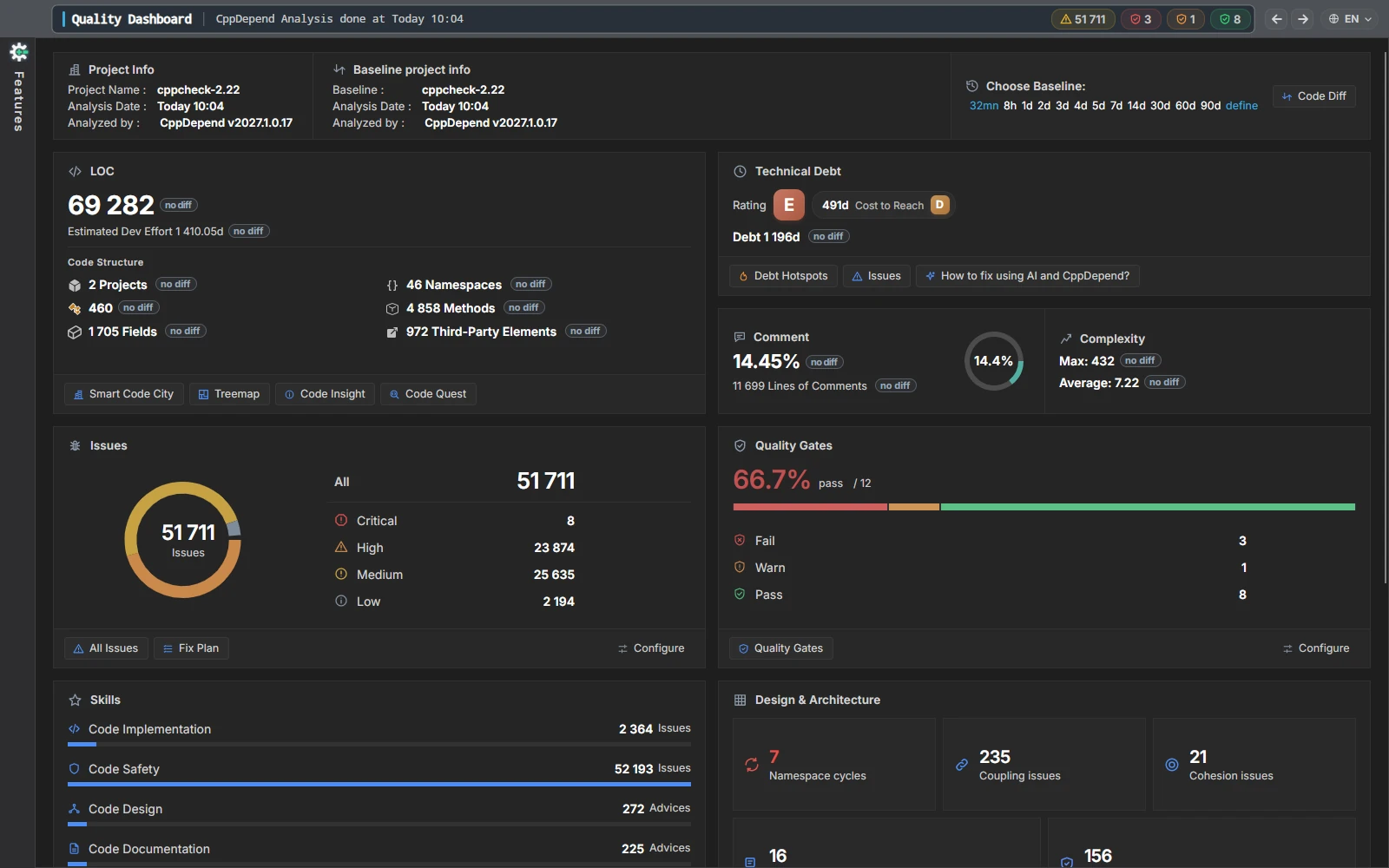
CppDepend Server (XDependServer) is a self-hosted web server. It stores the results uploaded by the Console (CI) and by Visual CppDepend, keeps the history of every project, and shows it in a browser with the same viewer as the desktop application, with no installation. Administrators create and configure projects on the server.
Quick start
XDependServer 5000
# open http://localhost:5000/admin  (first start: admin / admin, change it at once)
XDependServer token create --name ci --scopes upload --projects MyApp
CppDepend.Console MyApp.cdproj /OutDir out /ServerUrl https://server:5000 ...
gate-failed, gate-recovered, regression, upload.In a pipeline
curl -fsS -H "Authorization: Bearer $T" "$S/api/projects/MyApp/gate?require=passed"
# HTTP 409 when the gate is not passed
- Upload from Visual CppDepend (Settings > On-Premises Server: address, token, project, optional certificate pinning; automatic upload after each analysis, or a one-time Upload to server when done switch on the Code to Analyze page) or from the Console with
/ServerUrl. - Operations: one executable; settings are environment variables (
XDEPEND_SERVER_DATA,_URLS,_CERT,_PUBLIC_URL,_MAX_SESSIONS,_MAX_UPLOAD_MB,_RETENTION); backup is a copy of the data folder. - The gate state shown is the one the uploader reports (
/ServerGate); the server does not compute it.
The full guide, CppDepend-Server-Documentation.html, covers installation, security, the API, the command line, operations and troubleshooting.
Memory MapNew
Know what fills your flash and RAM, per function and per object, from the files your toolchain already produces.
- Map file readers: GNU ld map files, Arm Compiler (armlink) map files, and
nmoutput. The format is chosen for you. - Symbols are demangled and matched to the functions of your code model, so memory use sits next to complexity, debt and coverage.
- Memory Hotspots page (section Hotspots): the biggest consumers first.
- Memory settings page for the map and symbol files.
- The RTOS Memory Budget page adds the real-time view: RAM used and free against the RAM size, kernel heap needed against what is configured, flash used, a stacked RAM bar and the table of parts with their source (see RTOS).
Git InsightsNew
Your history shows where the code is fragile and where knowledge is thin. The tree has a GitHub Insights section, plus two pages in Evolution & Maintenance that use the same history.
| Page | Question it answers | How it is measured |
|---|---|---|
| Change Hotspots | Which files change most, and are they also complex or risky? | Commits of the period from git log. |
| Co-change Coupling | Which files change together in the same commits even though the code shows no dependency? | git log against the include graph, to tell hidden dependencies from declared ones. Mass commits are ignored. It also says whether the coupling grows or shrinks over time. |
| Ownership and Bus Factor | Who knows which part of the code, and where does the knowledge sit with one person only? | Lines changed by each author in the period (git log), not git blame. |
Choose the repository of the project once; a warning appears when none of the changed files belongs to the analysed code (probably the wrong repository). The same co-change data feeds the Architecture Blueprint.
Advanced CoverageNew
Bring the coverage you already measure, in the format your tool writes, and check it against the policy of your standard.
- Formats read automatically: LCOV, Cobertura, Clover, gcov / gcovr JSON, Bullseye, CTC++, Visual Studio coveragexml, Microsoft code coverage XML, Sonar generic coverage and the CppDepend generic JSON. Several files can be combined; an unknown or empty file is reported with a clear message.
- Coverage is mapped to methods, so it can be used in CQLinq and in the hotspots.
- Coverage Compliance (section Compliance): evaluates the coverage against the policy set by the compliance kit (for example the structural coverage expected at an ASIL, DAL or SIL).
- Test & Coverage Hotspots (section Hotspots): complex or risky code that is not covered.
- Coverage settings page for the files and options.
RTOSNew
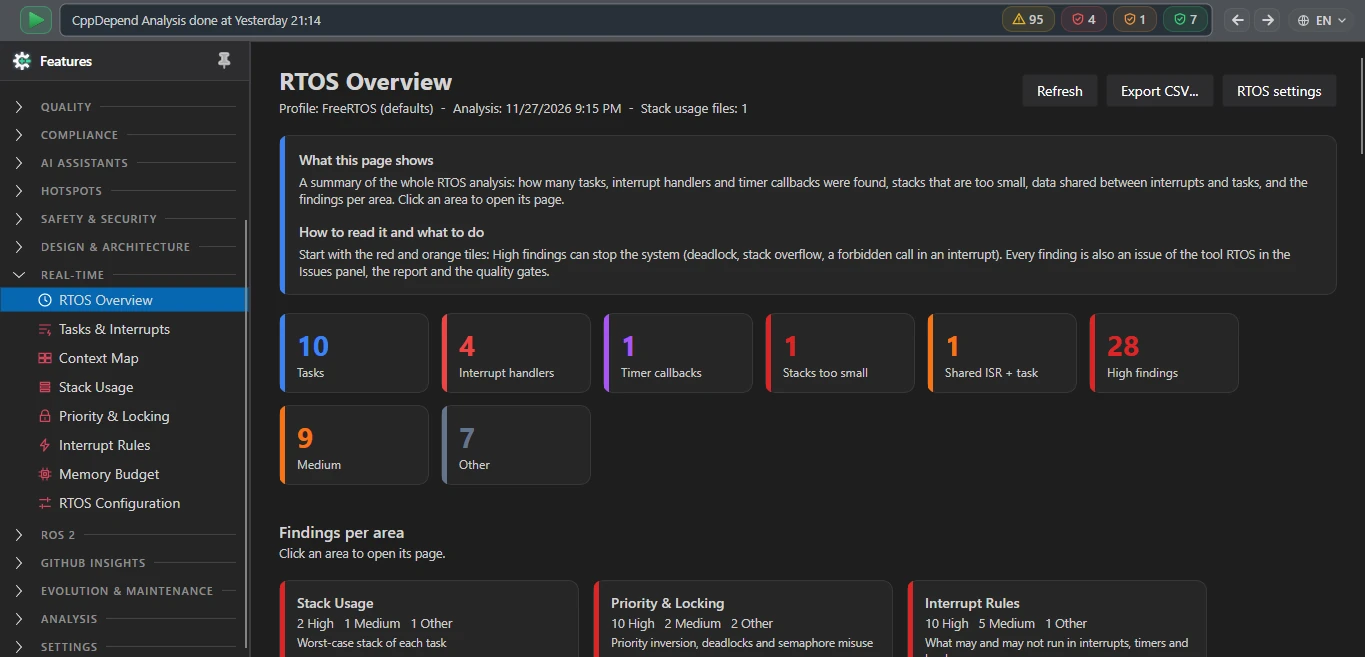
The Real-Time section answers the questions an embedded team asks before a release: what runs where, will the stacks hold, can anything deadlock or starve, is anything unsafe inside an interrupt, does the RAM budget fit. The analysis is static and works on the sources and on files you already have (FreeRTOSConfig.h or Zephyr prj.conf, compiler .su files, the linker map).
| Page | Shows |
|---|---|
| RTOS Overview | Tiles, areas, findings and the standards evidence |
| Tasks & Interrupts | Every task, interrupt handler and timer with priority and stack |
| Context Map | Which functions run in a task, an interrupt, a timer or several contexts |
| Stack Usage | Needed against given stack per task, interrupt stack, margins |
| Priority & Locking | Priority inversion, starvation, lock order, blocking while locked |
| Interrupt Rules | Non-interrupt-safe calls, heap, shared variables |
| Memory Budget | RAM and flash use, kernel heap, stacks |
| RTOS Configuration | Checks of FreeRTOSConfig.h and Zephyr Kconfig |
- FreeRTOS and Zephyr, selected automatically (Zephyr from
zephyr/kernel.horprj.conf; a smaller priority number is more urgent). - 35 rules plus configuration checks
RTOS-STACK / PRIO / SYNC / LOCK / CS / ISR / CTX / TMR / HEAP / SHARED / MEM / TASK / ZEP / CFG. - Findings are issues of the tool
RTOS: Issues panel, report, quality gates, CQLinq, with the execution context of every function queryable (m.RunsInIsr,m.RunsInTask). - Profile-driven: the lists of task-creation calls, blocking calls, interrupt-safe APIs, allocators and ISR names are editable in Settings > RTOS.
- A detailed RTOS Analysis Guide (HTML) accompanies the release.
ROS 2New
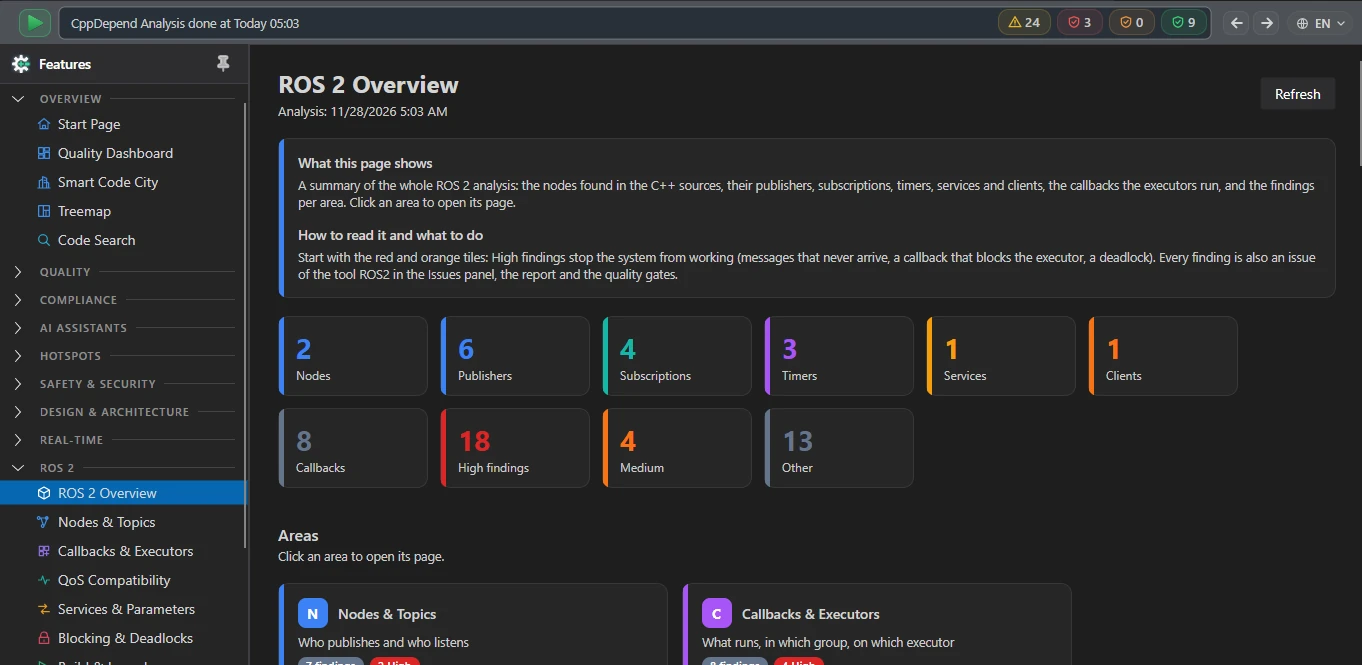
A ROS 2 system fails quietly: a wrong QoS or a mismatched type gives no error, only a silent topic. The ROS 2 section rebuilds the architecture of a C++ (rclcpp) package from its sources, package.xml, CMakeLists.txt, Python launch files and YAML parameter files, and checks it with 32 rules. No ROS installation is needed.
| Page | Shows |
|---|---|
| ROS 2 Overview | Counts of nodes, publishers, subscriptions, timers, services, clients, callbacks and findings |
| Nodes & Topics | Nodes and the topic graph with types, publishers, subscribers and state |
| Callbacks & Executors | Callbacks with trigger, callback group and type; executors; spin and lifetime rules |
| QoS Compatibility | Reliability, durability and history of every publisher and subscription |
| Services & Parameters | Services, actions, clients, declared parameters and YAML keys |
| Blocking & Deadlocks | Callbacks that sleep, wait, spin or loop; synchronous-call deadlock; shared data |
| Build & Launch | Packages, dependencies, find_package, launched nodes, namespaces and remaps |
- 32 rules
ROS2-TOPIC / QOS / SRV / CB / EXEC / LIFE / PARAM / BUILD / LAUNCH: for example QoS reliability and durability mismatch, message type mismatch, blocking call in a callback, service call deadlock, spin inside a callback, entity created and destroyed at once, parameter read but not declared, include missing frompackage.xml, remap that matches nothing. - Method callbacks and lambdas are analysed, and a helper called from a callback counts as part of it.
- Findings are issues of the tool
ROS2. Five rules carry CWE references (deadlock, endless loop, race, memory leak, unbounded history). - A detailed ROS 2 Analysis Guide (HTML) accompanies the release.
Embedded project supportNew
Real toolchains, no setup pain
- CppDepend now recognizes embedded compilers from their command line:
arm-none-eabi-gccand other gcc cross-compilers, Keil armcc and armclang, IAR, TI, Renesas, Green Hills, Tasking, sdcc, Cosmic, Diab, CodeWarrior and Microchip xc. - Vendor command-line options are translated to the gcc syntax the analyzer expects, including include paths, defines, preincludes and language standards.
- For gcc-style cross-compilers, CppDepend reads the compiler's real built-in include folders and predefined macros. If the compiler is missing, the analysis continues and the log explains what is missing.
- Vendor extensions such as
__interrupt,__root,__packed,__weak,__irqand__no_initno longer break parsing. - A bad project entry no longer stops the whole load. The analysis log lists what was skipped and why.
New project types
- New Embedded row in Code To Analyze with buttons for Keil uVision (
.uvprojx,.uvproj), IAR Embedded Workbench (.ewp) and STM32CubeIDE (.cproject). - Keil and IAR projects import include paths, defines, preincludes, source files and the excluded files of the selected configuration. For Keil this includes the CMSIS pack headers, and IAR project variables such as
$PROJ_DIR$are resolved. - Compilation databases are found automatically for Zephyr, ESP-IDF, PlatformIO and Yocto builds, as well as CMake, Ninja, Bear and Meson.
- Projects written on Windows open on Linux, including different path separators and letter case.
STM32CubeIDE and Eclipse CDT fixes
- Debug and Release settings are no longer merged. Each configuration now uses its own includes and defines.
- STM32
definedsymbolsoptions, forced includes, and-Dflags in the "other flags" options are now read. - Source files follow the configuration's source folders and exclusion lists, and the build output folder is skipped.
- GNU Arm toolchains get their real headers and cpu, fpu and float-abi macros.
- Linux paths in the Eclipse loader and workspace scan are fixed.
Safety & SecurityUpdated
The Safety & Security section groups the checks that matter before a release of safety-critical or exposed software.
| Page | What it does |
|---|---|
| Taint Attack Surface | Follows untrusted data from sources (where it enters, such as recv) to sinks (dangerous operations, such as system), with sanitisers (validation functions) recognised on the way. Sources, sinks and sanitisers are edited per project in Settings > Taint Sources and Sinks. main is always an entry point (command line). Works for C++ and Java projects. |
| Undefined Behavior | Finds code patterns whose behaviour the language does not define. |
| Exception Safety | Finds code that leaves resources or invariants broken when an exception is thrown. |
| Dependencies and SBOM | Third-party components, licences, vulnerabilities and exports (see SBOM). |
All of them feed the Issues panel and the quality gates, and the Compliance Kits switch on the matching secure-coding rules (CERT, CWE) and cybersecurity standards.
Architecture BlueprintNew
The Blueprint (section Design & Architecture) draws the architecture of your code base as components and layers, finds the dependencies that break it, and suggests the cheapest way to repair it.
- Automatic components: namespaces (C++), packages (Java) or projects are grouped into the number of components you ask for; components that are too small are merged into their parent or into “(other)”. Anonymous namespaces can be hidden.
- Declared layers: load or write your own layer rules (Configure layers…, Load a rules file…, Save an example file). A dependency that points to a layer above is a violation and is drawn in red.
- Cycles: for every dependency cycle, the blueprint proposes the smallest-weight set of component dependencies whose removal leaves no cycle. The weight of a dependency is the number of unit-level dependencies behind it, i.e. the work to remove it.
- Drill-down: click an arrow, or a name under Uses / Used by, to see the dependencies behind it. Third-party usage is shown per component.
- Change coupling: with a git repository, each component shows what it changes together with, so hidden coupling is visible next to the declared one (see Git Insights).
- Copy as Markdown report and Copy as Mermaid diagram for documentation and pull requests.
- Copy rule: generates a CQLinq rule for all layer violations, or only the new violations since the baseline, ready to paste into a quality gate.
Actionable findings
Available on the RTOS and ROS 2 pages, designed for audits and CI:
- Open at file and line: the Open button opens the source file at the finding, in the editor chosen in the options (in the browser, through VS Code). If it cannot, it copies the location.
- Standards references: MISRA C:2012, MISRA C++:2008, AUTOSAR C++14, CERT C/C++, CWE and NASA Power of Ten, only where a rule has a real counterpart. A Standards evidence card shows which references were checked and which have findings.
- Baseline and diff: Set baseline stores a fingerprint of each finding (rule, file name, function and message without numbers), so moving code does not make a finding new. Findings are badged New or in baseline, fixed ones are listed, and the option Only new findings in the Issues panel and quality gates makes a gate mean “no new High issue”. The file is
<project>.findings-baseline.json;make-baseline.pybuilds it in CI.
Other improvements
- CMake and
compile_commands.json: a CMake project chosen throughCMakeLists.txtor its folder now finds its compile database (build,out,cmake-build-*…), reads thefileanddirectoryfields, handles quoted paths andarguments, and no longer drops the following entries after a bad one. This fixes “no source file found”. - Languages: new texts are translated into French, German, Spanish, Japanese and Chinese.
- Features tree: reorganised sections, with Design & Architecture before Real-Time and ROS 2, and only Overview expanded at start.
- Browser and VS Code: the findings pages work in the WebAssembly viewer, and the Open button uses VS Code there.
Upgrade notes
- Run a new analysis after upgrading: the RTOS and ROS 2 pages, the SBOM and the standards evidence read result files produced by this version. Older results show “No result yet”.
- Safety standards and coding rules are chosen when a project is created. To apply a kit to an existing project, create the project again or tick the rules by hand.
- On the server, publish the new server and the web viewer together: their versions must match. Keep the data folder.
- For SBOM in CI without internet access, set
CPPDEPEND_SBOM_ONLINE=0.
Known limits
- RTOS: static analysis only, no timing (no WCET or schedulability analysis). Stack figures exclude library code. Task entries behind function pointers or macros are listed as unresolved.
- ROS 2: C++ only (no
rclpy); Python launch files only;.msgand.srvdefinitions are not checked. - SBOM: OSV.dev has no vcpkg or Conan catalogue; the check needs internet access or a cached result.
- Standards: references are guidance; they are not a certificate of conformance.
- Server: the quality gate state is the one the uploader reports.
Try CppDepend 2027on your own code.
Download the full product for 30 days. Missing something your team needs? We build it for free.