
User Guides
RTOS Analysis Guide
What the Real-Time section of CppDepend shows, how to read each page, and what to do about each finding. Illustrated with a FreeRTOS demo project (10 tasks, 4 interrupt handlers, 1 timer).
Introduction
The Real-Time section of the Features tree answers the questions an embedded team asks before a release: what runs where, will the stacks hold, can anything deadlock or starve, is anything unsafe inside an interrupt, does the RAM budget fit? It works on the C/C++ sources and on build artefacts you already have (FreeRTOSConfig.h or Zephyr prj.conf, compiler .su files, the linker map). Nothing is run on the target.
RTOS: Issues panel, report, quality gates, CQLinq.How it works
- Detection. The analysis runs on its own when the project contains
FreeRTOSConfig.h(FreeRTOS) or a Zephyr project (prj.conf,zephyr/kernel.h). Settings > RTOS can force it on or off. - Entry points. Tasks come from the creation calls (
xTaskCreate,K_THREAD_DEFINE,k_thread_create…), interrupts from the vector table / IRQ connect calls and name patterns, timers and hooks from their registration calls. - Context propagation. Each entry point labels every function it can reach (through the call graph) with a context: Task, ISR, Timer, Tick, Idle, Startup, Kernel. A function reached from several entry points carries several labels.
- Rules. The rules compare each call with the context it runs in (a task-only API in an ISR), follow locks and critical sections, size stacks from the
.sufiles along the deepest call path, and read the linker map for memory. - Output. Findings become imported issues of the tool
RTOS; the full result is written next to the analysis result as<result>.rtos.json, which the pages read.
The demo project
The screenshots in this guide come from one analysis of a FreeRTOS demo project with deliberately planted problems. Key figures, as shown on the Overview page:
| Item | Value |
|---|---|
| Tasks | 10 (high, lockA, lockB, leak, waiter, sensor, mid, math, logger, low) |
| Interrupt handlers | 4 (EXTI0_IRQHandler, TIM2_IRQHandler, USART1_IRQHandler, tick hook) |
| Timer callbacks | 1 |
| Findings | 28 High, 9 Medium, 7 Other |
| Stacks too small | 1 (task sensor: 216 B needed, 192 B given) |
| Shared ISR + task | 1 function (Checksum) |
| RAM | 101% used of 20.0 KB (−128 B free); kernel heap 144% needed |
1 · RTOS Overview
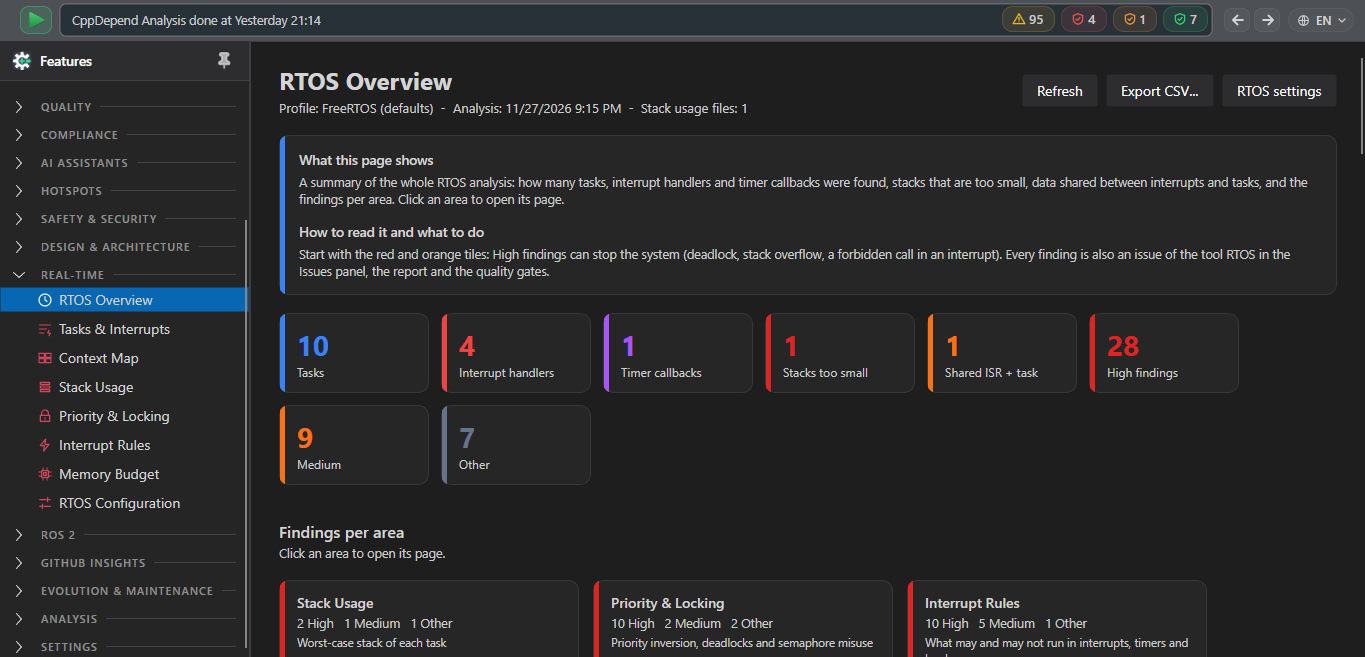
Purpose. One screen summarising the whole analysis. Read it first, then follow the areas to the detail pages.
What you see
- Header: the profile (here FreeRTOS (defaults)), the time of the analysis and the number of stack usage files read. Buttons: Refresh (re-read the result file), Export CSV… (tasks, contexts and findings), RTOS settings.
- Explanation card (blue): what the page shows and how to act.
- Tiles: Tasks, Interrupt handlers, Timer callbacks, Stacks too small, Shared ISR + task, High findings, Medium, Other. Red/orange tiles need attention; green means none.
- Findings per area: one card per page (Stack Usage, Priority & Locking, Interrupt Rules, …) with the number of High / Medium / Other findings. Click a card to open the page.
What to do
Open the area with the most High findings. High findings can stop the system (deadlock, stack overflow, a forbidden call in an interrupt). Below the area cards the page lists all findings grouped by rule and, since the findings update, the baseline bar and the standards evidence card (see below).
2 · Tasks & Interrupts
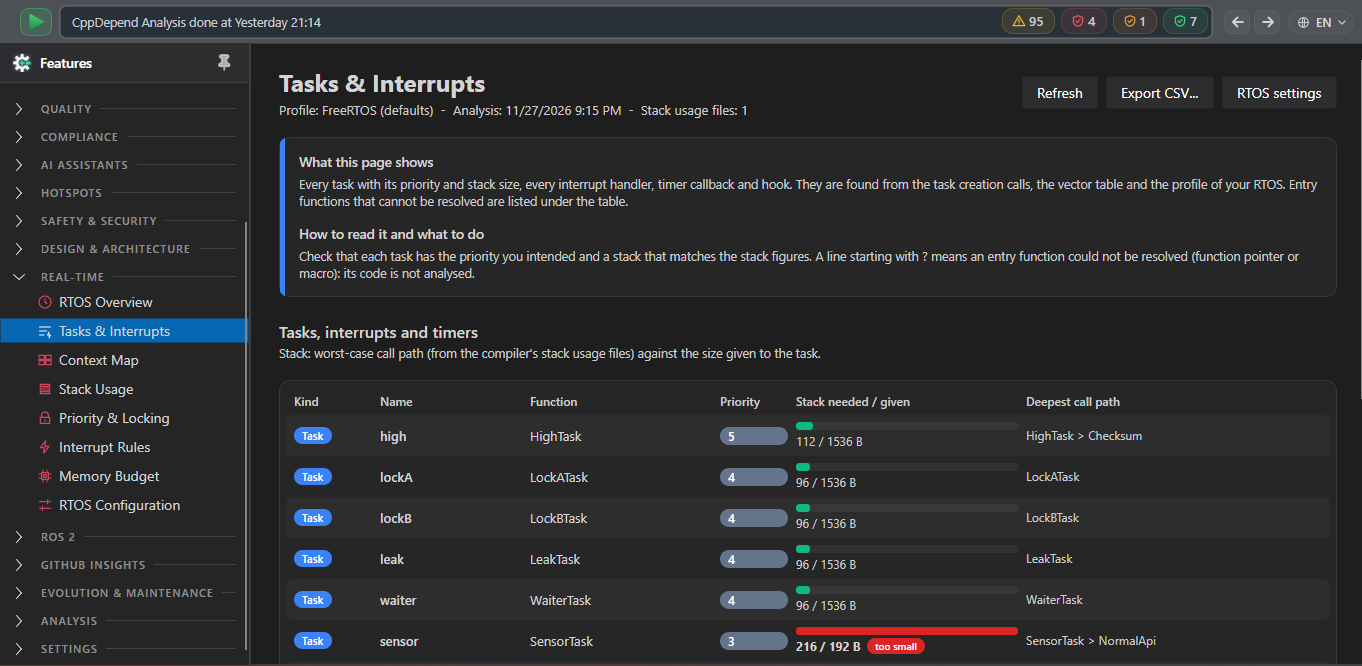
Purpose. The list of everything the scheduler or the hardware can start: tasks, interrupt handlers, timer callbacks and hooks.
| Column | Meaning |
|---|---|
| Kind | Badge: Task, ISR, Timer, Idle hook, Tick hook… |
| Name | The task name given at creation (high, lockA…); for interrupts the handler name. |
| Function | The entry function (HighTask). Hover for file, line and why it was recognised; click to copy the location. |
| Priority | FreeRTOS: higher number = more urgent. Zephyr: lower number = more urgent, negative = cooperative thread (the page says so). |
| Stack needed / given | Bar of worst-case need against the size given to the task. Green = fine, orange = less than 20% margin, red = too small. |
| Deepest call path | The call chain behind the figure (SensorTask > NormalApi), with “(dynamic stack)” or “(recursion)” when relevant. |
sensor (priority 3) needs 216 B but has 192 B: a red bar and a too small badge. All other tasks have 1536 B and use between 96 and 168 B.What to do
Check that each task has the priority you intended. A line starting with ? means an entry function could not be resolved (function pointer or macro): its code is not analysed, so check it by hand or add it in Settings > RTOS.
3 · Context Map
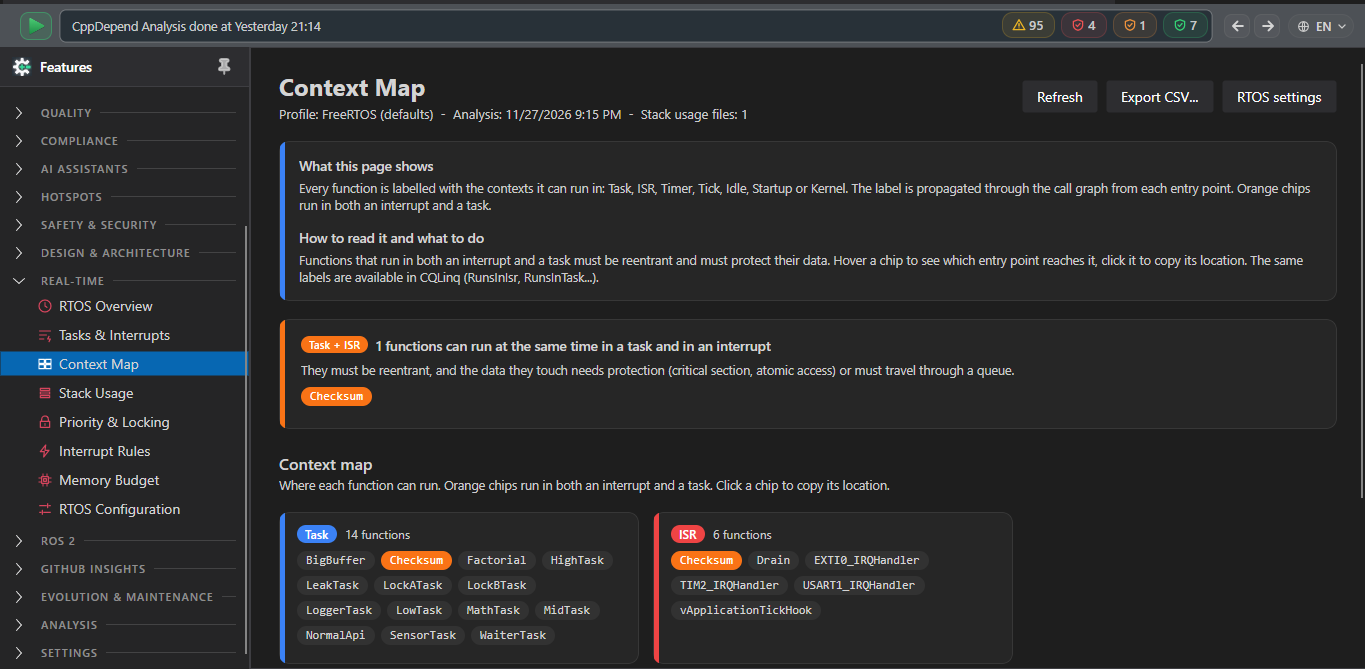
Purpose. Show where each function can run. This is the foundation of the ISR rules: it tells whether a call such as xQueueSend happens in an interrupt.
Reading it
- One panel per context: Task (14 functions in the demo), ISR (6), and Timer, Tick, Idle, Startup, Kernel when present.
- Each function is a chip. Orange chips run in both an interrupt and a task (
Checksumin the demo). They are summarised in the orange card on top: “1 functions can run at the same time in a task and in an interrupt”. - Hover a chip to see the contexts, the file and line and the entry points that reach it; click to copy the location.
The same labels are available in CQLinq: m.RunsInIsr, m.RunsInTask, m.RunsInTimer, m.RtosContexts. Export CSV includes the full context list.
4 · Stack Usage
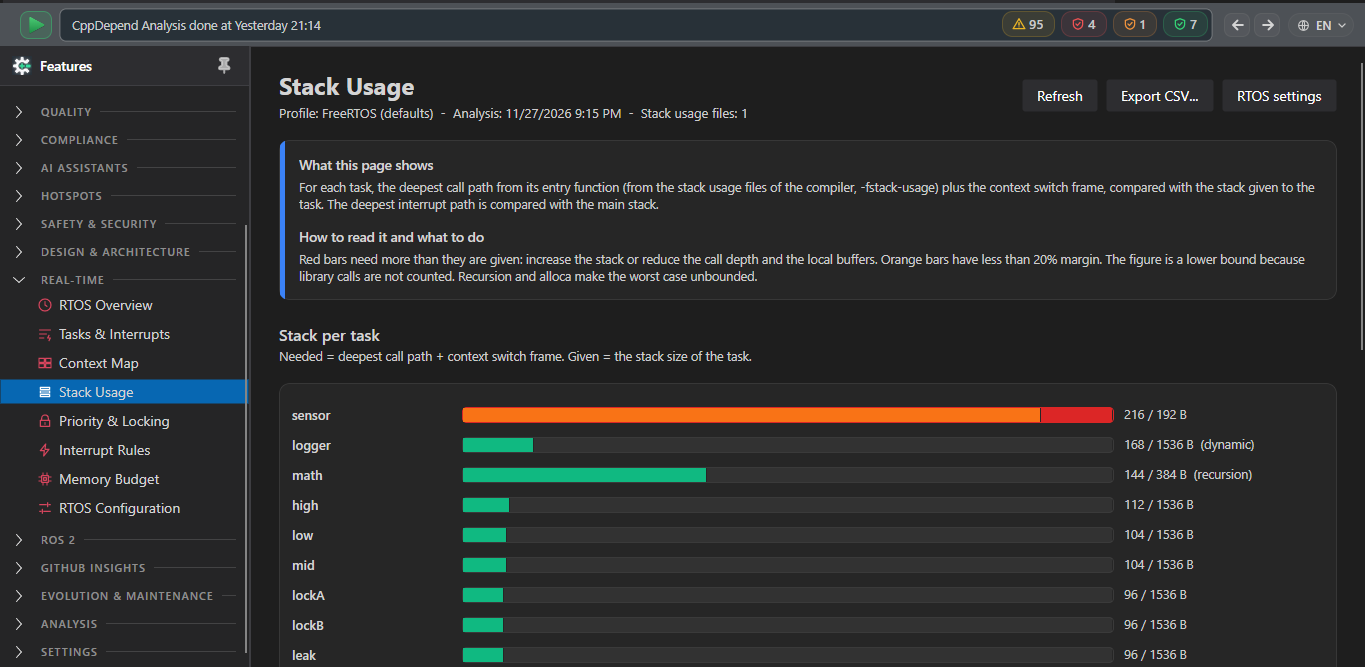
Purpose. Will each task's stack hold the worst case?
How the figure is built
Needed = deepest call path from the entry function, summing the frame size of each function (from the compiler's -fstack-usage .su files), plus the context-switch frame of the port. Given = the stack size passed at creation (words × word size, or the Zephyr stack size). The deepest interrupt path is compared with the main stack of the linker script.
Reading the bars
- Green: enough margin. Orange: less than 20% margin. Red: needs more than it is given. In the demo
sensoris red: 216 / 192 B. - Notes after a figure: (dynamic) = alloca or a variable-length array makes the need unbounded (
logger); (recursion) = recursive calls make it unbounded (math).
| Rule | What it detects | How to fix | Standards |
|---|---|---|---|
RTOS-STACK-00 | No stack usage data was found, so stack sizes cannot be checked. | Compile with -fstack-usage and add the folder of the .su files in Settings > RTOS. | |
RTOS-STACK-01 | A task needs more stack than it is given (deepest call path + context switch frame). | Increase the stack of the task, or reduce the call depth and local buffers. | |
RTOS-STACK-02 | Less than 20% margin between needed and given stack. | Keep a margin: the figure is a lower bound (library calls are not counted). | |
RTOS-STACK-03 | alloca or a variable-length array is reachable from a task: the worst case is unbounded. | Use a fixed-size buffer. | MISRA C:2012 R18.8; CERT ARR32-C, MEM05-C; CWE-770 |
RTOS-STACK-04 | Deepest interrupt stack use (information), to compare with the main stack of the linker script. | Compare with _Min_Stack_Size (Zephyr: CONFIG_ISR_STACK_SIZE). | |
RTOS-STACK-05 | Recursion reachable from a task. | Replace the recursion by a loop. | MISRA C:2012 R17.2; MISRA C++:2008 7-5-4; AUTOSAR A7-5-2; NASA P10 R1; CWE-674 |
5 · Priority & Locking
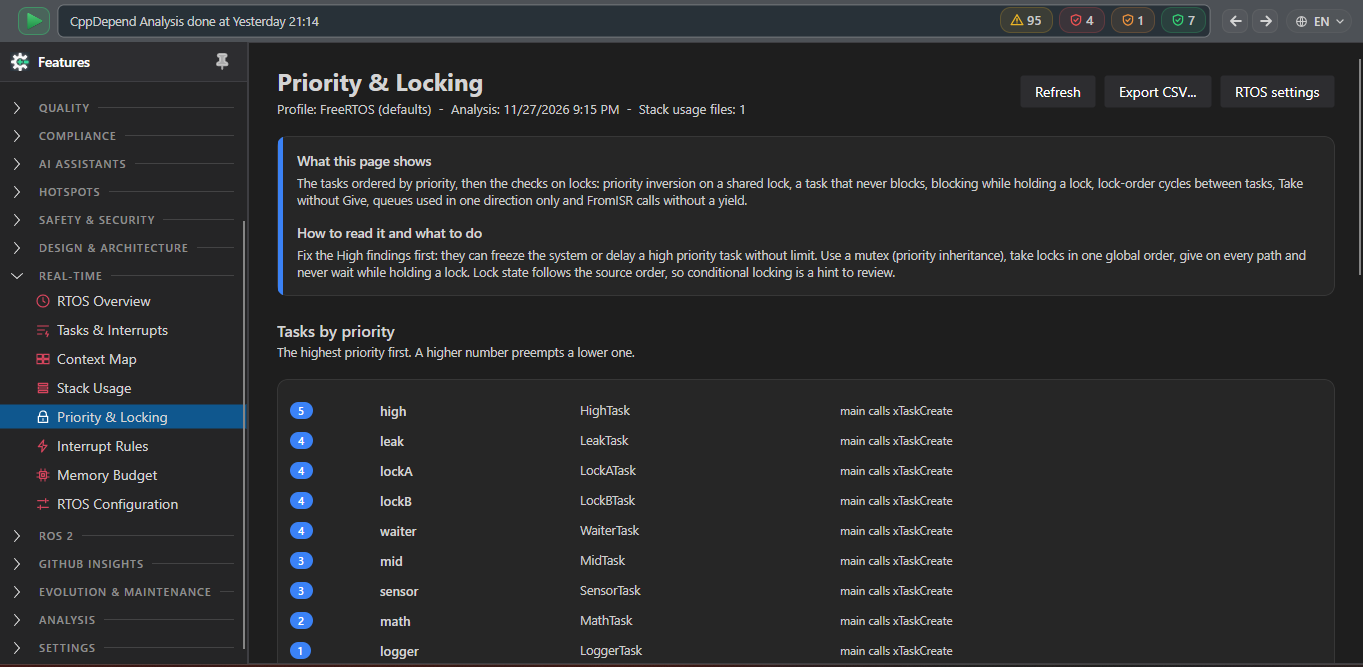
Purpose. Catch the problems that appear only under the wrong interleaving: deadlock, priority inversion, starvation, semaphores that are taken and never given.
What you see
- Tasks by priority: highest priority first (here
high= 5 down tologger= 1), with the function and how the task is created (“main calls xTaskCreate”). - Below: the findings of the area, grouped by rule (see the table). Lock state is followed in source order, so conditional locking is reported as a hint to review.
| Rule | What it detects | How to fix | Standards |
|---|---|---|---|
RTOS-PRIO-01 | Priority inversion on a shared lock (a high and a low priority task share a lock with a medium task in between). | Protect the resource with a mutex (priority inheritance) and hold it briefly. | |
RTOS-PRIO-02 | A task never blocks: lower-priority tasks and the idle task starve. | Block on a queue, semaphore, notification or vTaskDelay. | |
RTOS-PRIO-03 | Blocking while holding a lock. | Release the lock before waiting, or copy the data and wait outside the lock. | CWE-667 |
RTOS-PRIO-04 | Lock-order cycle between tasks: possible deadlock. | Always take the locks in the same global order, or merge them. | MISRA C:2012 Dir 5.2; CERT CON35-C, CON53-CPP; CWE-833 |
RTOS-PRIO-05 (Zephyr) | Thread priority outside the configured range. | Use a priority between -CONFIG_NUM_COOP_PRIORITIES and CONFIG_NUM_PREEMPT_PRIORITIES - 1. | |
RTOS-SYNC-01 | Take without a matching Give on some path. | Give on every path, including early returns and error paths. | CWE-667 |
RTOS-SYNC-02 | Semaphore or queue used in one direction only. | Add the missing producer or consumer, or remove the object. | |
RTOS-SYNC-03 | FromISR call without a yield flag. | Pass &xHigherPriorityTaskWoken and call portYIELD_FROM_ISR. | |
RTOS-LOCK-01 | Unbounded wait (portMAX_DELAY) where waiting is forbidden. | Use a finite timeout and handle the failure. | |
RTOS-CS-01 | Blocking call inside a critical section. | Leave the critical section before waiting. | |
RTOS-CS-02 | Critical section not exited on every path. | Every path must call the matching exit. | CWE-667 |
RTOS-TASK-01 (Zephyr) | Thread created with K_FOREVER delay and never started. | Call k_thread_start or create it with K_NO_WAIT. |
6 · Interrupt Rules
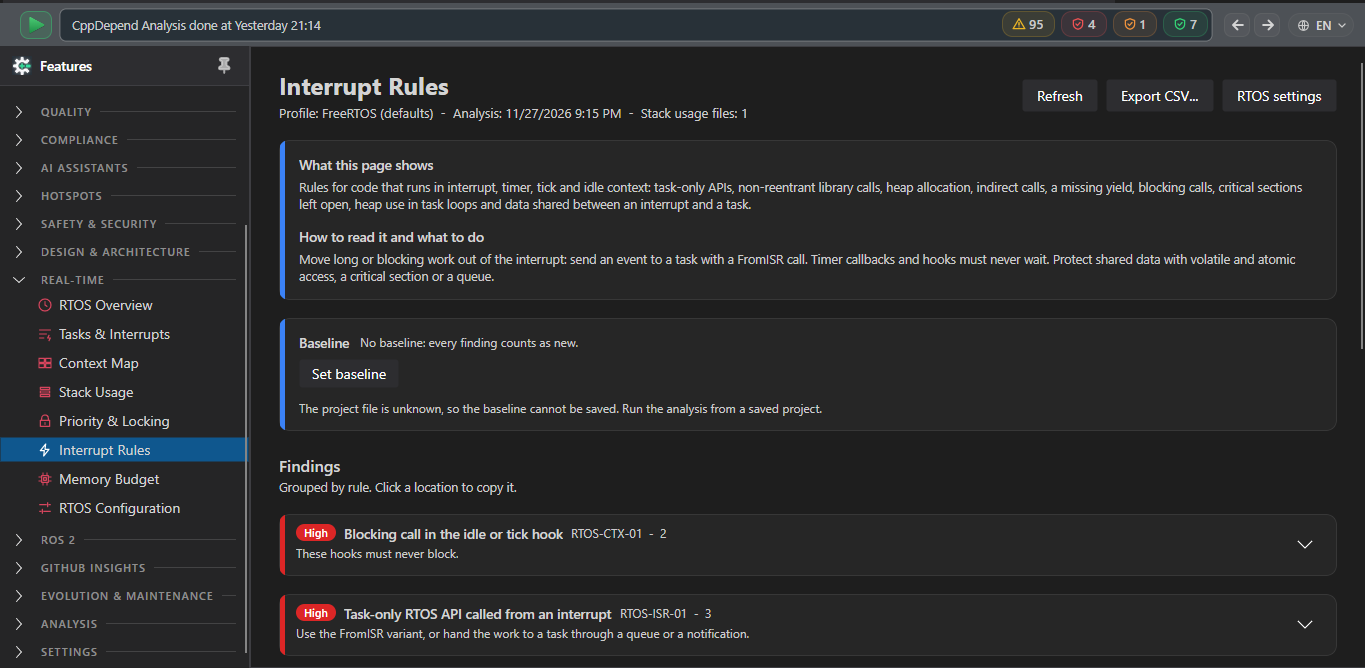
Purpose. Check code that runs in interrupt, timer, tick and idle context, where blocking or non-reentrant calls are forbidden, plus heap use and unprotected shared data.
Reading the findings
Each rule is a card: severity badge, title, rule id and count, and a one-line remedy. Click the card to expand the individual findings (message, file:line, function). The screenshot shows Blocking call in the idle or tick hook (2) and Task-only RTOS API called from an interrupt (3). The Baseline card above the list is explained in Baseline & new findings.
…FromISR call and return. Timer callbacks and hooks must never wait.| Rule | What it detects | How to fix | Standards |
|---|---|---|---|
RTOS-ISR-01 | Task-only RTOS API called from an interrupt. | Use the FromISR variant, or hand the work to a task through a queue or notification. | |
RTOS-ISR-03 | Interrupt variant used in a task. | Use the normal API in task code. | |
RTOS-ISR-04 | Non-reentrant library call (printf, strtok, rand…) in an interrupt. | Move it to a task; keep interrupts short. | MISRA C:2012 R21.6; CERT CON33-C; CWE-663 |
RTOS-ISR-05 | Heap allocation in an interrupt. | Allocate before, or use a static buffer or a pool. | MISRA C:2012 Dir 4.12, R21.3; MISRA C++:2008 18-4-1; AUTOSAR C++14 A18-5-1; NASA P10 R3 |
RTOS-ISR-06 | Higher-priority-task-woken flag not handled. | Initialise it to pdFALSE and pass it to portYIELD_FROM_ISR. | |
RTOS-ISR-07 | Indirect call in an interrupt: the target and run time cannot be checked. | Prefer a direct call. | |
RTOS-CTX-01 | Blocking call in the idle or tick hook. | These hooks must never block. | |
RTOS-TMR-01 | Blocking call in a timer callback: it stalls the timer service task. | Use a zero timeout or defer to a task. | |
RTOS-HEAP-01 | Heap allocation in a task loop (fragmentation). | Allocate once, or use static allocation or a pool. | MISRA C:2012 Dir 4.12, R21.3; MISRA C++:2008 18-4-1; AUTOSAR C++14 A18-5-1; NASA P10 R3 |
RTOS-SHARED-01 | Variable written in an interrupt and used by a task without volatile/atomic access or a critical section. | Use atomic access, a critical section, or pass the data through a queue. | MISRA C:2012 Dir 5.1; CERT CON43-C, SIG31-C; CWE-362 |
RTOS-ZEP-01 (Zephyr) | Kernel call from a zero-latency interrupt. | Set a flag and let a normal interrupt or a thread do the call. |
7 · Memory Budget
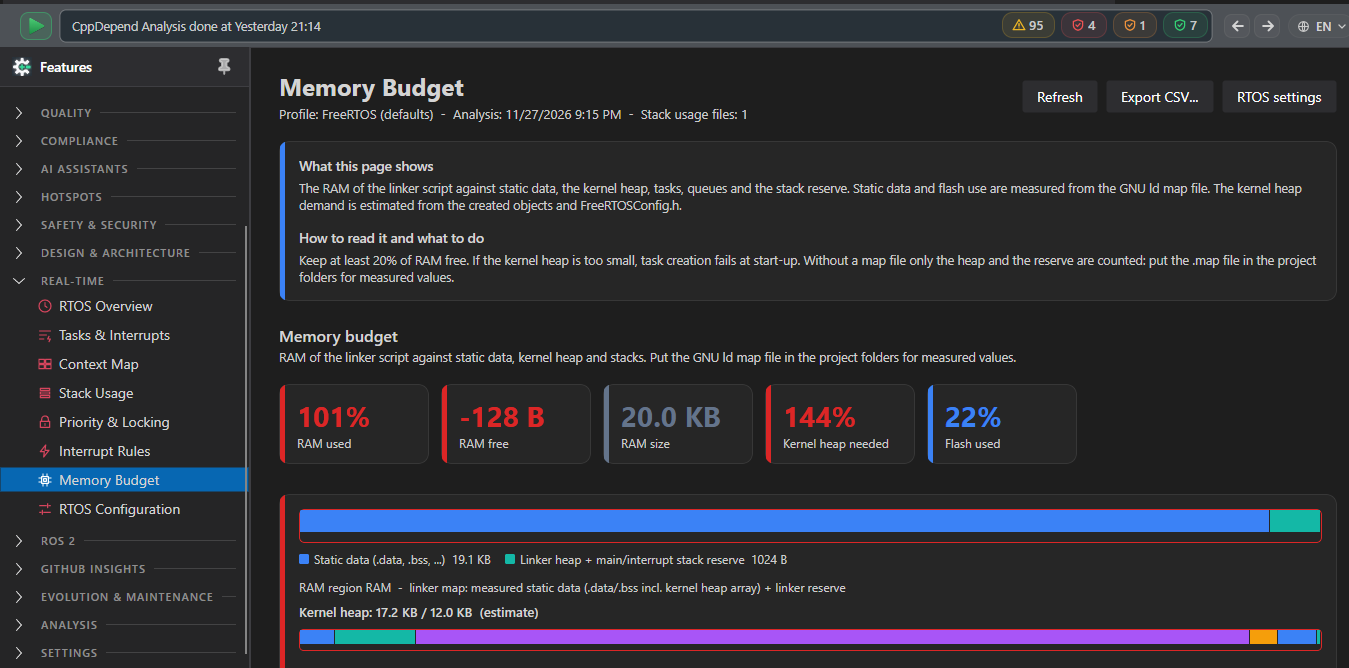
Purpose. Does everything fit in RAM, and is the kernel heap big enough for what the code creates?
Tiles
| Tile | Meaning |
|---|---|
| RAM used / RAM free / RAM size | Static data + kernel heap array + linker reserve against the RAM region of the linker script (demo: 101%, −128 B, 20.0 KB). |
| Kernel heap needed | Estimated demand of the created tasks, queues, semaphores… against configTOTAL_HEAP_SIZE (demo: 144%, 17.2 KB of 12.0 KB). |
| Flash used | Code and constants against the flash region (demo: 22%). |
Bars
- RAM bar: static data (
.data,.bss…) and the linker heap + main/interrupt stack reserve. A red outline means over budget. - Kernel heap bar: split by task stacks, queues and other objects; marked estimate.
.map file, static data and flash are measured. Without it only the heap and the reserve are counted: put the map file in the project folders.Keep at least 20% of RAM free. If the kernel heap is too small, task creation fails at start-up.
| Rule | What it detects | How to fix | Standards |
|---|---|---|---|
RTOS-MEM-00 | Memory budget (information). | ||
RTOS-MEM-01 | RAM budget nearly used or exceeded. | Reduce static buffers, heap and stack sizes, or move data to another RAM region. | |
RTOS-MEM-02 | Kernel heap too small for the created objects. | Increase configTOTAL_HEAP_SIZE or reduce task stacks and queue sizes. | |
RTOS-MEM-03 | Main / interrupt stack too small. | Increase _Min_Stack_Size in the linker script (Zephyr: CONFIG_ISR_STACK_SIZE) or shorten the interrupt call path. | |
RTOS-MEM-04 (Zephyr) | k_malloc used without a system heap. | Set CONFIG_HEAP_MEM_POOL_SIZE in prj.conf, or use static objects and memory slabs. | MISRA C:2012 Dir 4.12, R21.3; NASA P10 R3 |
8 · RTOS Configuration
No screenshot in this set; the page audits FreeRTOSConfig.h (or Kconfig for Zephyr) against recommended values. Each finding gives the macro, the recommended value and the reason. Rule ids are RTOS-CFG-<macro>.
| Typical finding | Why it matters |
|---|---|
configASSERT not defined | The kernel does not stop on API misuse; errors stay silent. |
| Stack overflow check disabled | An overflowing task corrupts memory without notice. |
| Malloc-failed hook missing | A failed allocation goes unnoticed. |
| Interrupt priorities | configMAX_SYSCALL_INTERRUPT_PRIORITY and priority bits must be consistent with the port. |
The file used is shown in the result; choose another in Settings > RTOS.
Reading a finding
Every finding, on every page, has the same shape:
- Severity: High can freeze or corrupt the system; Medium a real risk with a condition; Low/Info hints and facts.
- Message: names the function, the call and the context (“xQueueSend is not interrupt-safe but USART1_IRQHandler can run in an ISR”).
- Location
file:line function: click to copy. - Open button: opens the source file at that line (in the editor chosen in the options; in the browser through VS Code).
- Standards chips (MISRA, CERT, AUTOSAR, CWE, NASA P10) when the rule has a real counterpart.
- New / in baseline badge once a baseline exists.
Baseline & new findings
For CI gates you usually care about what is new. The baseline card (visible on every findings page, see the Interrupt Rules screenshot) takes the current findings as the reference.
- Set baseline / Update baseline: stores a fingerprint of every finding (rule + file name + function + message without numbers). Moving code does not make a finding new.
- Clear baseline: forget the reference.
- Show only new findings here: filters the page.
- Only new findings in the Issues panel and quality gates: from the next analysis, findings already in the baseline are not sent to the Issues panel, the report and the gates. A gate on “no High issue of tool RTOS” then means “no new High issue”.
- A list of findings fixed since the baseline appears when some disappeared.
<project>.findings-baseline.json). The screenshot shows the message that appears when the analysis did not know the project file: run the analysis from a saved project.Without the GUI (CI): make-baseline.py <project> <analysis-result> [--only-new] builds the file from the result files.
Standards evidence
The Overview page ends with a Standards evidence card. Each chip is a rule of a standard that the checks cover; green = checked and no finding, red = findings to fix or justify.
| Standard | References used |
|---|---|
| MISRA C:2012 | Dir 4.12, Dir 5.1, Dir 5.2, R17.2, R18.8, R21.3, R21.6 |
| MISRA C++:2008 | 18-4-1, 7-5-4 |
| AUTOSAR C++14 | A18-5-1, A7-5-2 |
| CERT C / C++ | CON33-C, CON35-C, CON43-C, SIG31-C, ARR32-C, MEM05-C, CON53-CPP |
| CWE | 362, 663, 667, 674, 770, 833 |
| NASA Power of Ten | Rule 1 (no recursion), Rule 3 (no dynamic memory after init) |
CQLinq & Issues
Findings are imported issues of the tool RTOS, so they appear in the Issues panel, the HTML report, the quality gates and CQLinq (ImportedIssues). Issue type = the rule id. The execution context of each function is queryable:
// functions that run in an interrupt and allocate
from m in Methods where m.RunsInIsr && m.IsUsing("malloc") select m

// functions shared by interrupt and task
from m in Methods where m.RunsInIsr && m.RunsInTask select m
Settings > RTOS
| Setting | Use |
|---|---|
| Analysis mode | Automatic / Always / Never. |
| RTOS | Auto, FreeRTOS or Zephyr. |
| Configuration file | FreeRTOSConfig.h, or for Zephyr the build's .config and prj.conf. Empty = search in the project. |
| Stack usage folders | Folders of the .su files (compile with -fstack-usage). |
| Word size, switch frame | Bytes per stack word and context-switch frame of your port. |
| Function lists | Task-creation calls, callbacks, blocking calls, ISR-safe and task-only APIs, allocators, ISR name patterns, critical-section macros, configuration checks (FreeRTOS lists; Zephyr uses built-in lists). |
Zephyr
Selected automatically when sources include zephyr/kernel.h or the project has a prj.conf. Differences: threads come from K_THREAD_DEFINE and k_thread_create; interrupts from IRQ_CONNECT; timers and work items from their init calls; the configuration is read from prj.conf and the build's .config (Kconfig). A smaller priority number is more urgent and a negative number is a cooperative thread; the pages show this. Extra rules: RTOS-ZEP-01, RTOS-PRIO-05, RTOS-TASK-01, RTOS-MEM-04.
Result files
| File | Content |
|---|---|
<result>.rtos.json | Everything the pages show (tasks, contexts, stacks, memory, findings with fingerprints and standards). |
<result>.rtos-contexts.csv | Function → contexts, for tools. |
<project>.findings-baseline.json | The baseline (RTOS and ROS 2). |
Limits
- Static analysis: no run-time behaviour, no timing (no WCET or schedulability analysis yet).
- Function pointers, macro-built tasks and generated code can hide entry points (listed as unresolved).
- Stack figures exclude library code; interrupt nesting is not summed.
- Lock tracking follows source order; conditional locking is a hint.
- Memory estimates of the kernel heap are estimates; static data is exact only with a map file.
Troubleshooting
| Symptom | Cause and remedy |
|---|---|
| “No RTOS result yet” | Run the analysis, then Refresh. Results from an older version need a new analysis. |
| “The RTOS analysis did not run on this project” | No FreeRTOSConfig.h or Zephyr project found: set Settings > RTOS to Always, or give the config file. |
| No stack figures | No .su files: compile with -fstack-usage and add the folder (finding RTOS-STACK-00). |
| Memory shows only heap and reserve | No .map file in the project folders. |
| Task shown with “?” | Entry function unresolved (function pointer or macro). |
| Baseline cannot be saved | Project file unknown: analyse from a saved project. |
All rules
34 rules plus the configuration checks (RTOS-CFG-*).
| Rule | What it detects | How to fix | Standards |
|---|---|---|---|
RTOS-STACK-00 | No stack usage data was found, so stack sizes cannot be checked. | Compile with -fstack-usage and add the folder of the .su files in Settings > RTOS. | |
RTOS-STACK-01 | A task needs more stack than it is given (deepest call path + context switch frame). | Increase the stack of the task, or reduce the call depth and local buffers. | |
RTOS-STACK-02 | Less than 20% margin between needed and given stack. | Keep a margin: the figure is a lower bound (library calls are not counted). | |
RTOS-STACK-03 | alloca or a variable-length array is reachable from a task: the worst case is unbounded. | Use a fixed-size buffer. | MISRA C:2012 R18.8; CERT ARR32-C, MEM05-C; CWE-770 |
RTOS-STACK-04 | Deepest interrupt stack use (information), to compare with the main stack of the linker script. | Compare with _Min_Stack_Size (Zephyr: CONFIG_ISR_STACK_SIZE). | |
RTOS-STACK-05 | Recursion reachable from a task. | Replace the recursion by a loop. | MISRA C:2012 R17.2; MISRA C++:2008 7-5-4; AUTOSAR A7-5-2; NASA P10 R1; CWE-674 |
RTOS-PRIO-01 | Priority inversion on a shared lock (a high and a low priority task share a lock with a medium task in between). | Protect the resource with a mutex (priority inheritance) and hold it briefly. | |
RTOS-PRIO-02 | A task never blocks: lower-priority tasks and the idle task starve. | Block on a queue, semaphore, notification or vTaskDelay. | |
RTOS-PRIO-03 | Blocking while holding a lock. | Release the lock before waiting, or copy the data and wait outside the lock. | CWE-667 |
RTOS-PRIO-04 | Lock-order cycle between tasks: possible deadlock. | Always take the locks in the same global order, or merge them. | MISRA C:2012 Dir 5.2; CERT CON35-C, CON53-CPP; CWE-833 |
RTOS-PRIO-05 (Zephyr) | Thread priority outside the configured range. | Use a priority between -CONFIG_NUM_COOP_PRIORITIES and CONFIG_NUM_PREEMPT_PRIORITIES - 1. | |
RTOS-SYNC-01 | Take without a matching Give on some path. | Give on every path, including early returns and error paths. | CWE-667 |
RTOS-SYNC-02 | Semaphore or queue used in one direction only. | Add the missing producer or consumer, or remove the object. | |
RTOS-SYNC-03 | FromISR call without a yield flag. | Pass &xHigherPriorityTaskWoken and call portYIELD_FROM_ISR. | |
RTOS-LOCK-01 | Unbounded wait (portMAX_DELAY) where waiting is forbidden. | Use a finite timeout and handle the failure. | |
RTOS-CS-01 | Blocking call inside a critical section. | Leave the critical section before waiting. | |
RTOS-CS-02 | Critical section not exited on every path. | Every path must call the matching exit. | CWE-667 |
RTOS-TASK-01 (Zephyr) | Thread created with K_FOREVER delay and never started. | Call k_thread_start or create it with K_NO_WAIT. | |
RTOS-ISR-01 | Task-only RTOS API called from an interrupt. | Use the FromISR variant, or hand the work to a task through a queue or notification. | |
RTOS-ISR-03 | Interrupt variant used in a task. | Use the normal API in task code. | |
RTOS-ISR-04 | Non-reentrant library call (printf, strtok, rand…) in an interrupt. | Move it to a task; keep interrupts short. | MISRA C:2012 R21.6; CERT CON33-C; CWE-663 |
RTOS-ISR-05 | Heap allocation in an interrupt. | Allocate before, or use a static buffer or a pool. | MISRA C:2012 Dir 4.12, R21.3; MISRA C++:2008 18-4-1; AUTOSAR C++14 A18-5-1; NASA P10 R3 |
RTOS-ISR-06 | Higher-priority-task-woken flag not handled. | Initialise it to pdFALSE and pass it to portYIELD_FROM_ISR. | |
RTOS-ISR-07 | Indirect call in an interrupt: the target and run time cannot be checked. | Prefer a direct call. | |
RTOS-CTX-01 | Blocking call in the idle or tick hook. | These hooks must never block. | |
RTOS-TMR-01 | Blocking call in a timer callback: it stalls the timer service task. | Use a zero timeout or defer to a task. | |
RTOS-HEAP-01 | Heap allocation in a task loop (fragmentation). | Allocate once, or use static allocation or a pool. | MISRA C:2012 Dir 4.12, R21.3; MISRA C++:2008 18-4-1; AUTOSAR C++14 A18-5-1; NASA P10 R3 |
RTOS-SHARED-01 | Variable written in an interrupt and used by a task without volatile/atomic access or a critical section. | Use atomic access, a critical section, or pass the data through a queue. | MISRA C:2012 Dir 5.1; CERT CON43-C, SIG31-C; CWE-362 |
RTOS-ZEP-01 (Zephyr) | Kernel call from a zero-latency interrupt. | Set a flag and let a normal interrupt or a thread do the call. | |
RTOS-MEM-00 | Memory budget (information). | ||
RTOS-MEM-01 | RAM budget nearly used or exceeded. | Reduce static buffers, heap and stack sizes, or move data to another RAM region. | |
RTOS-MEM-02 | Kernel heap too small for the created objects. | Increase configTOTAL_HEAP_SIZE or reduce task stacks and queue sizes. | |
RTOS-MEM-03 | Main / interrupt stack too small. | Increase _Min_Stack_Size in the linker script (Zephyr: CONFIG_ISR_STACK_SIZE) or shorten the interrupt call path. | |
RTOS-MEM-04 (Zephyr) | k_malloc used without a system heap. | Set CONFIG_HEAP_MEM_POOL_SIZE in prj.conf, or use static objects and memory slabs. | MISRA C:2012 Dir 4.12, R21.3; NASA P10 R3 |
Thanks for your feedback. Tell us more or request a feature.